The Web Service API is EvTrack’s REST interface for other systems. A CRM, booking engine, hotel or hospital management system, building portal, or in-house application can use it to pre-register visitors, issue and revoke temporary visitor credentials, drive a visit through its status lifecycle, read and maintain personnel and users, look up reference data such as locations and visit reasons, upload photos, and feed card or QR code reads into access control from software instead of physical hardware.
Everything the API can do is also possible in the admin interface. The API exists so an upstream system can do it automatically, at the moment its own workflow demands it - for example creating a visitor invitation the instant a meeting is booked, and cancelling it the instant the meeting is called off.
Before you start you need three things:
- An administrator account that may manage API keys.
- An API key with the right permissions ticked. See API Key Configuration.
- The base URL of your EvTrack server. On the hosted service this is
https://service.evtrack.com. On premises it is whatever address your server is published on.
1. Base URL and versioning
Every endpoint lives under a single, versioned prefix:
https://<your-evtrack-server>/api/ws/v1/<resource>
v1is the current interface version. It is part of the path, so a future version can be introduced beside it without breaking existing integrations.- All traffic must use HTTPS. Keys travel in a request header, so plain HTTP would expose them.
- The machine-generated reference for every endpoint, field, and schema is published at https://api.docs.evtrack.com/. Use that for the exact field-by-field contract; use these pages for what the endpoints mean and when to call them.
2. Authentication
Send the API key in the standard Authorization request header on every call:
Authorization: LeM7xfYqRM2ylpOhQIYmOnDNKJCGChkfiPb7HE/z4+igETi+kunzwNOj1NY9+705fT589c1oh04HHSohamdE40zuZpv/3EweWMnVzSXo89c=
- The header value is the key exactly as EvTrack displayed it when the key was created. A
Bearerprefix is optional: it is accepted and stripped, soAuthorization: Bearer <key>works identically. There is no separate login call, no session, and no cookie: each request stands alone. - The key length is checked first, before the key is even parsed: a value shorter than 64 or longer than 256 characters is rejected as unauthorized immediately.
- There is no username or password anywhere in the API. To cut an integration off, disable or delete its key.
- Every request is scoped to the system the key belongs to. A key can only read and change records in its own system, so a UUID that exists elsewhere reads as
404.
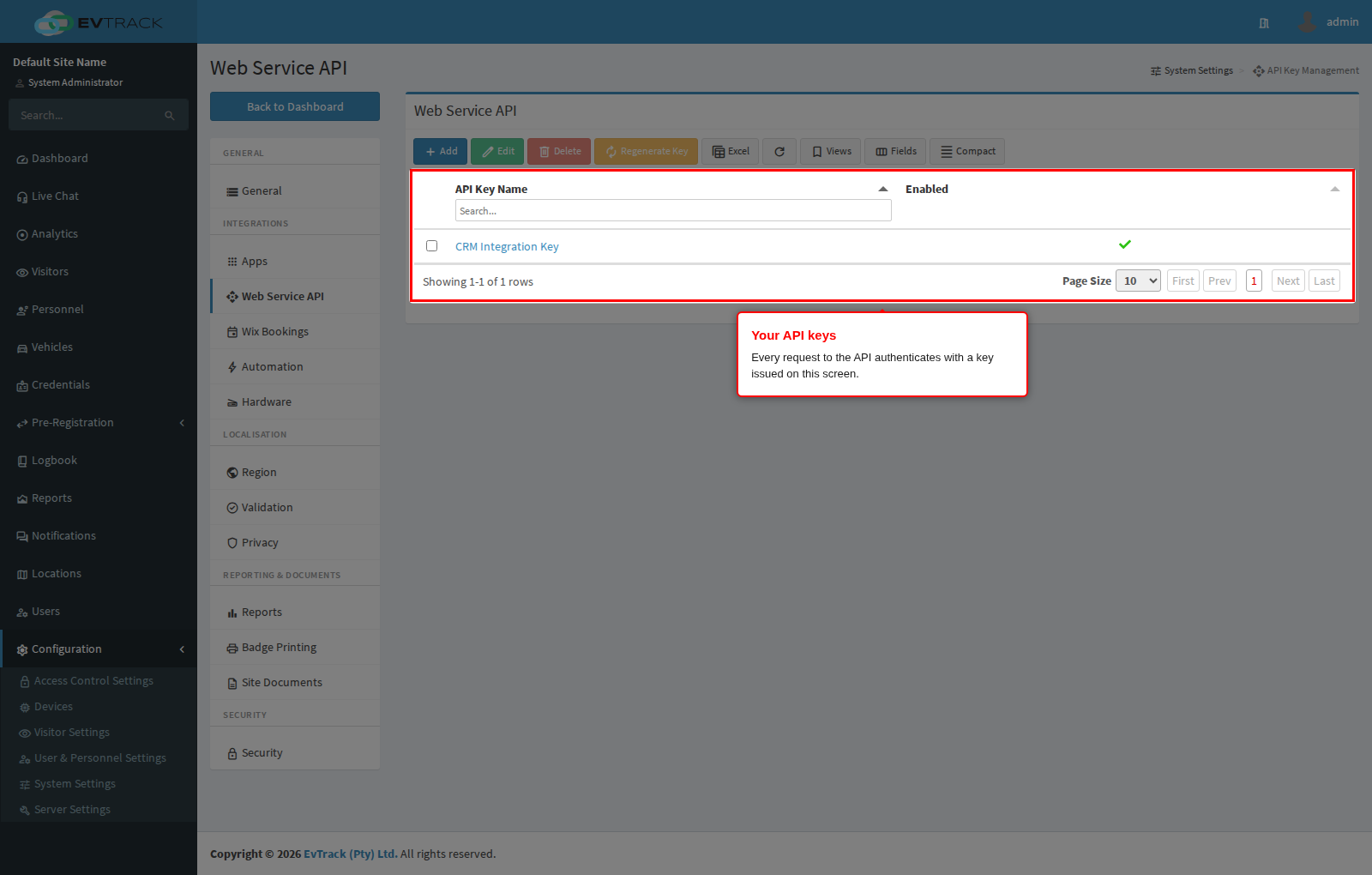
Creating a key. Open Configuration > System Settings > Web Service API, click Add, name the key after the application that will use it, tick only the permissions that application needs, tick Enable, and save. The key value is displayed once, immediately after saving, and can never be shown again - copy it into the consuming application straight away. Full walkthrough, including the optional payload encryption settings: API Key Configuration.
Permissions. Rights are granted per key, per resource, and separately for reading and writing. If a key calls an endpoint whose right is not ticked, the call fails with 403 and nothing is read or changed. Grant the narrowest set that the integration actually needs, and use a separate key per application so one can be revoked without disturbing the others.
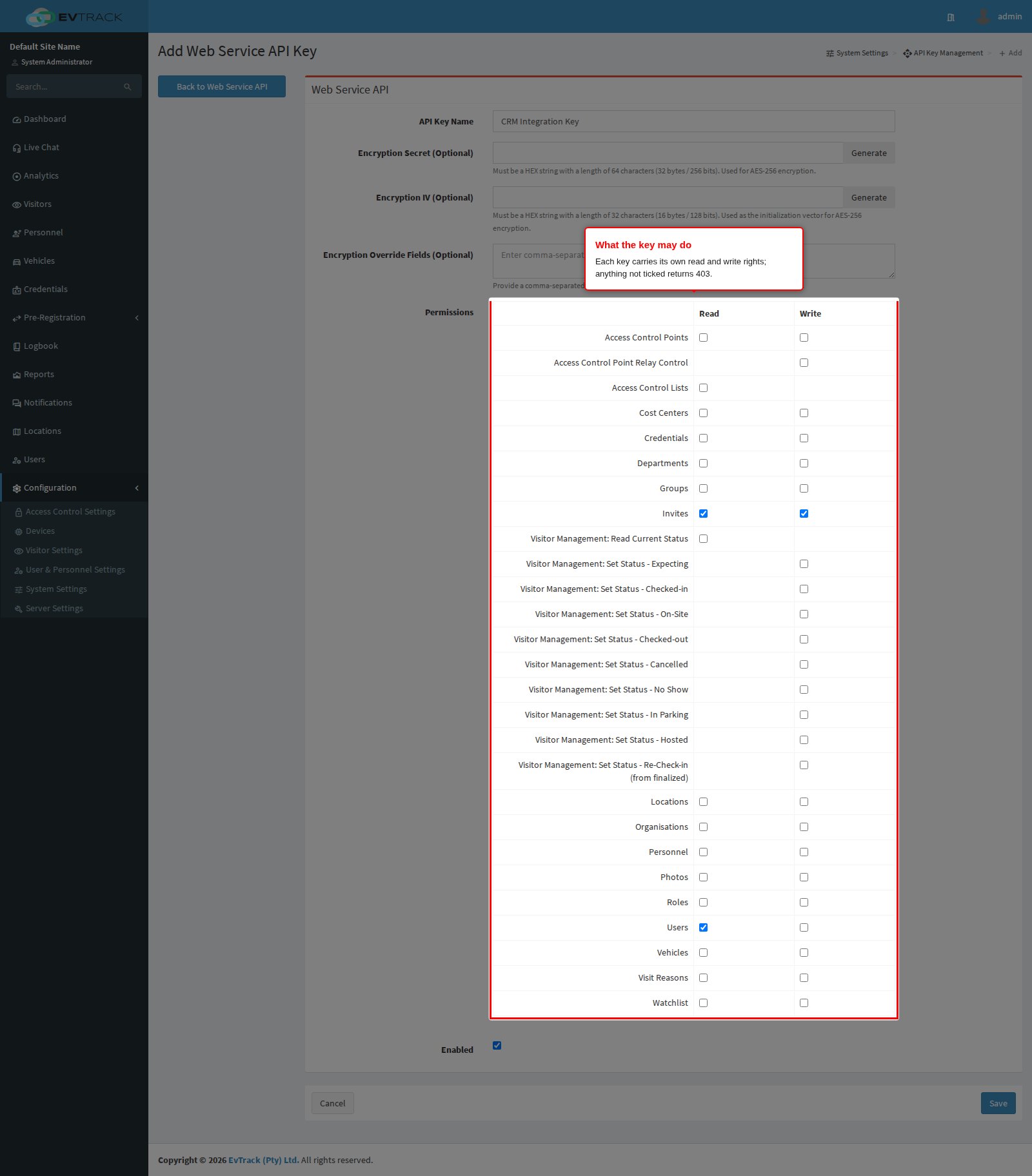
Optional payload encryption. A key can also carry an Encryption Secret and Encryption IV. When both are set, EvTrack decrypts the sensitive fields of every request payload and encrypts them again in every response, using AES-256 in CBC mode. The field list, the override option, and worked encrypt and decrypt code are documented in API Key Configuration.
3. Request and response conventions
Content type. Request bodies are JSON and must be sent with Content-Type: application/json. Responses are JSON, except where an endpoint returns an image or a file. The single exception on the request side is the photo upload endpoint, which takes multipart/form-data.
Identifiers. Records are addressed by UUID in the path, never by an internal number:
GET /api/ws/v1/invites/7aaee0e2-6884-4fd7-ba63-21d76723dce2
A visitor invitation’s UUID is called the registration ID, and it is returned as registrationId when the invitation is created. A value that is not a valid UUID is rejected with 422 before the endpoint runs.
Field naming. Response fields use camel case (firstName, registrationId). Visitor invitation payloads additionally accept the underscore spellings first_name, last_name, identity_number, alternative_number and visit_type on input, so older integrations keep working.
Unknown fields are ignored. A field the interface does not recognise is discarded rather than rejected, so adding your own bookkeeping fields to a payload will not break a call. Do not rely on them coming back.
Date and time. All date/time fields are ISO-8601 timestamps that carry their own offset, for example 2026-07-07T13:25:43.366Z. The trailing Z means UTC, and UTC is the recommended way to send them: an absolute instant cannot be misread. A different offset such as 2026-07-07T15:25:43.366+02:00 is accepted and converted. A timestamp with no offset is ambiguous and should be avoided. Responses always render date/time values in UTC.
The values you send are absolute moments in time, not wall-clock times in the operator’s region. The admin interface displays them in the configured display time zone, so an invitation sent as 07:00Z shows as 09:00 to an operator in a region two hours ahead of UTC. Send UTC, and let the interface do the conversion.
Validity windows are rounded. When an invitation is created or updated, the activation time is rounded down to the start of its minute and the expiry time is rounded up to the last second of its minute. A window of 09:00:30 to 17:00:10 is stored as 09:00:00 to 17:00:59, so a credential is never a few seconds short of the minute an operator sees on screen.
Pagination. List endpoints take start (zero-based index of the first row, default 0) and limit (rows per page, 1 to 1000, default 100) as query parameters, and answer with the rows plus the counters needed to page through them:
{
  "entries": [ ... ],
  "startIndex": 0,
  "countReturned": 100,
  "totalCount": 2841
}
Page by increasing start by limit until startIndex + countReturned reaches totalCount. A limit above 1000 is rejected.
Filtering. Filters are endpoint-specific query parameters, for example filter=CURRENT and visitorUUID=<uuid> on the invitation list. They are documented with each endpoint in the chapters listed below.
4. Errors and status codes
An error response carries a numeric code and a human-readable reason:
{
  "code": 422,
  "reason": "422 - Unprocessable Entity - Invalid Fields: [@email: must be a valid email address]"
}
Field-level validation failures add an errors object keyed by field name. Rejected values are never echoed back, so an error response is safe to log.
| Code | Meaning | Typical cause |
|---|---|---|
200 | OK | Read, update, delete, or status change succeeded |
201 | Created | A new visitor invitation was created |
400 | Bad Request | Missing or unreadable JSON body, missing path parameter, limit out of range, unsupported image type on upload |
401 | Unauthorized | Missing, malformed, disabled, or unknown API key. On the virtual reader it also means the credential was DENIED |
403 | Forbidden | The key is valid but that permission is not ticked |
404 | Not Found | No record with that UUID, or it belongs to a different environment |
409 | Conflict | The transaction has already been recorded |
412 | Precondition Failed | A signed media link has passed its expiry |
415 | Unsupported Media Type | The credential needs a second factor that this interface cannot supply |
422 | Unprocessable Entity | Field validation failed, a date/time could not be parsed, a UUID path value is malformed, or a referenced location, host, or visit reason does not exist |
424 | Failed Dependency | No access control point is wired to the virtual reader interface |
425 | Too Early | The update is identical to what is already stored, so nothing was changed |
429 | Too Many Requests | The key’s rate limit is exhausted |
451 | Unavailable For Legal Reasons | The visitor matched a watchlist entry and was denied |
Treat 422 and 451 as final: retrying the identical request produces the identical result. Treat 429 as temporary.
Rate limiting. Each API key has its own allowance of 2000 units, replenished at 800 units per minute. A create or update of an invitation, a photo upload, and a photo download each cost 50 units; list, read, delete, and status-change calls cost 30; a status read or file delete costs 10. A failed authentication attempt costs 400 units, so a client looping on a bad key throttles itself quickly. When the allowance runs out the API answers 429; back off and retry, doubling the wait each time rather than retrying immediately.
5. Restricting the API to the local machine
On-premises installations that only ever call the API from software running on the EvTrack server itself can close the interface to the network entirely:
evtrack.security.config.hardening.webservice-api.restrict-to-localhost=true
With this enabled, requests to the API are accepted only from 127.0.0.1 and the IPv6 loopback address; everything else is refused before authentication is even attempted. The default is false. Do not enable it if any integration calls EvTrack from another host. See Security Configuration.
6. Resource index
| Resource group | Base path | Documented in |
|---|---|---|
| Visitor invitations | /api/ws/v1/invites | Invites and Visits |
| Visit status transitions | /api/ws/v1/invites/{registrationId}/status | Invites and Visits |
| Users | /api/ws/v1/users | People and Credentials API |
| Personnel | /api/ws/v1/persons | People and Credentials API |
| Credentials | /api/ws/v1/credentials | People and Credentials API |
| Locations | /api/ws/v1/locations | Reference Data API |
| Departments | /api/ws/v1/departments | Reference Data API |
| Organisations | /api/ws/v1/organisations | Reference Data API |
| Groups | /api/ws/v1/groups | Reference Data API |
| Roles | /api/ws/v1/roles | Reference Data API |
| Cost centers | /api/ws/v1/cost-centers | Reference Data API |
| Visit reasons | /api/ws/v1/visit-reason | Reference Data API |
| Vehicles | /api/ws/v1/vehicles | Reference Data API |
| Watchlists | /api/ws/v1/watchlists | Reference Data API |
| Access control points | /api/ws/v1/access-control-points | Reference Data API |
| Access control lists | /api/ws/v1/access-control-lists | Reference Data API |
| Photo upload and delete | /api/ws/v1/files | Files and Media |
| Photo and thumbnail download | /api/ws/v1/photos | Files and Media |
| Signed media links | /api/ws/v1/storage | Files and Media |
| Virtual reader | /api/ws/v1/virtual/reader | Files and Media |
| Outbound event delivery | (your endpoints) | Webhooks |
Two configuration screens change how the API behaves and are worth reading before you build against it:
- Web Service API (Visitors) - which visitor fields are mandatory on an incoming registration, and whether an unrecognised location name is tolerated or rejected.
- Web Service API - the API key list itself.
7. Worked example: create a visitor invitation
curl -X 'POST' \
  'https://service.evtrack.com/api/ws/v1/invites' \
  -H 'accept: application/json' \
  -H 'Authorization: LeM7xfYqRM2ylpOhQIYmOnDNKJCGChkfiPb7HE/z4+igETi+kunzwNOj1NY9+705fT589c1oh04HHSohamdE40zuZpv/3EweWMnVzSXo89c=' \
  -H 'Content-Type: application/json' \
  -d '{
  "activation": "2026-07-07T13:25:43.366Z",
  "email": "alexander.grant@evtrack.com",
  "expiry": "2026-07-10T13:25:43.366Z",
  "first_name": "Alexander",
  "last_name": "Grant",
  "location": "542 Main Street",
  "mobile": "+12125680012"
}'
Response:
{
  "code": 201,
  "message": "created",
  "registrationId": "57fa54a4-d6a5-4a04-a559-b97d6043dccf",
  "visitorId": "b793da5f-476c-4f54-9eb5-daa4db21d70d",
  "type": "QR_CODE",
  "accessCode": "d617278d",
  "inviteLink": "https://app.evtrack.com/i/u/57fa54a4-d6a5-4a04-a559-b97d6043dccf"
}
Keep the registrationId. Every later call about this visit - read it, update it, cancel it, check the visitor in or out - is addressed by that value.
8. Worked example: find a user by mobile number
User lookups use the search endpoint, which takes its criteria in the request body. The plain GET /api/ws/v1/users listing is deprecated for searching; use POST /api/ws/v1/users/search.
The criteria field for a phone number is mobileNumber, not mobile. This matters: an unrecognised criteria field is silently ignored rather than rejected, so "mobile": "+12125680012" returns the unfiltered first page instead of the one user you were looking for. The other criteria are firstName, lastName, email and identityNr, alongside the start and limit paging values.
curl -X 'POST' \
  'https://service.evtrack.com/api/ws/v1/users/search' \
  -H 'accept: application/json' \
  -H 'Authorization: Bearer LeM7xfYqRM2ylpOhQIYmOnDNKJCGChkfiPb7HE/z4+igETi+kunzwNOj1NY9+705fT589c1oh04HHSohamdE40zuZpv/3EweWMnVzSXo89c=' \
  -H 'Content-Type: application/json' \
  -d '{
  "start": 0,
  "limit": 500,
  "mobileNumber": "+12125680012"
}'
Response:
{
  "entries": [
    {
      "uuid": "21bf9d3b-8c8f-4eec-a398-c9650d0dc2c0",
      "email": "alexander.grant@evtrack.com",
      "firstName": "Alexander",
      "lastName": "Grant",
      "mobile": "+12125680012"
    }
  ],
  "startIndex": 0,
  "countReturned": 1,
  "totalCount": 50
}
The returned uuid is what you pass as hostUser when creating an invitation, so the visit is attributed to the right host.