Photographs are the one part of the API that does not travel as ordinary JSON. This chapter covers the four interfaces that move images and files, plus the virtual reader, which lets software submit a credential read that would normally come from physical hardware.
| Interface | Base path | Use it for |
|---|---|---|
| Photo upload | /api/ws/v1/files | Uploading a photo before creating or updating a person or a user |
| Photo download | /api/ws/v1/photos | Fetching a stored photo or its thumbnail with an API key |
| Signed media links | /api/ws/v1/storage | Opening a photo or document from a link EvTrack generated, with no API key |
| Virtual reader | /api/ws/v1/virtual/reader | Submitting a card or QR code read from software instead of a physical reader |
Before you start, read the API overview for the base URL, the Authorization header, and the shared error codes.
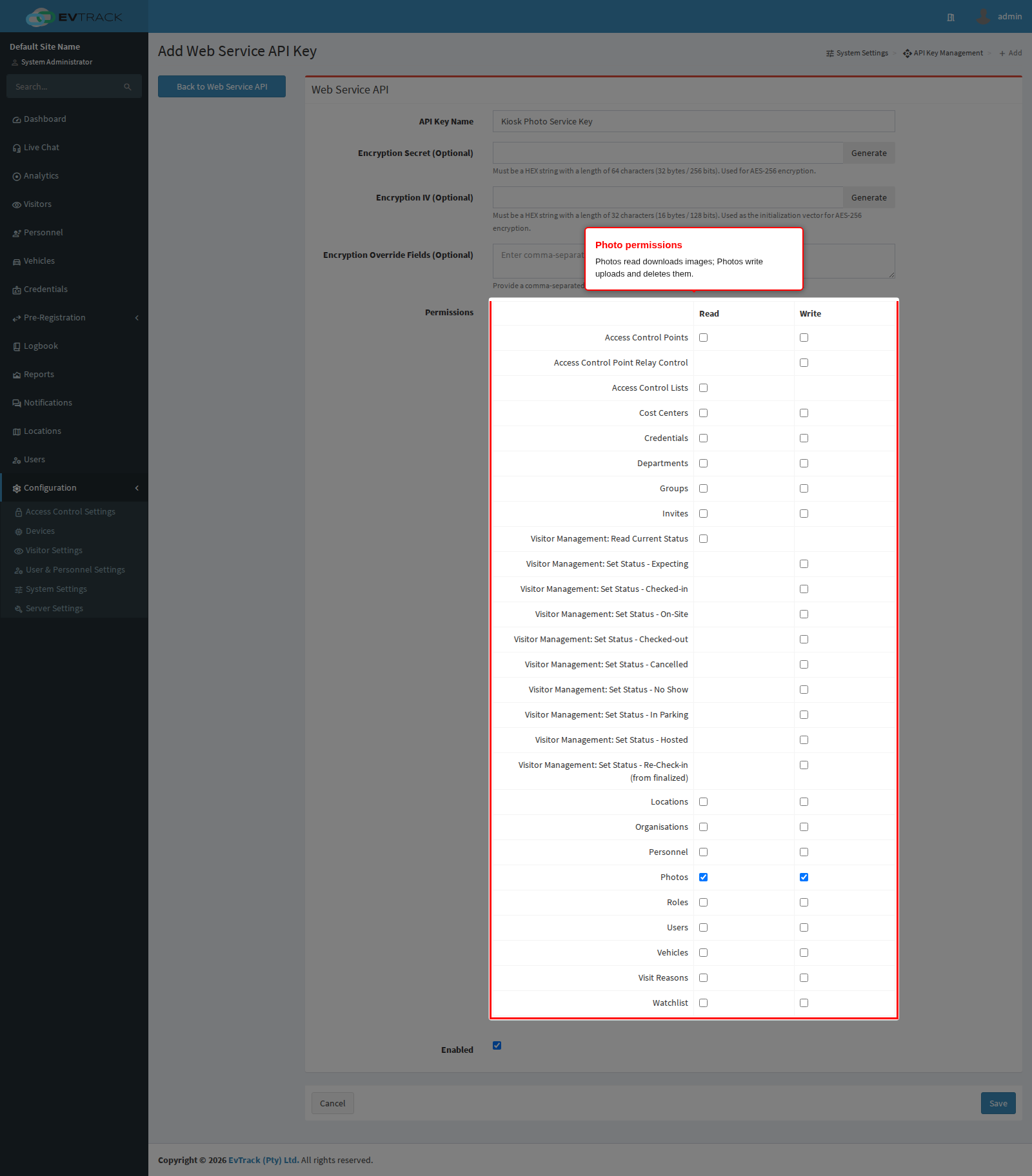
1. Permissions
| Right on the key | Grants |
|---|---|
| Photos - Write | Upload a photo, delete an uploaded photo |
| Photos - Read | Download a photo or a thumbnail |
The signed media links and the virtual reader do not use an API key at all. They authenticate differently, and each is explained in its own section below.
2. Upload a photo
POST /api/ws/v1/files/upload
Content-Type: multipart/form-data
This is a two-step pattern. Upload the image first, then reference the UUID you get back when you create or update the record:
- Post the image as a
multipart/form-datarequest with the file in a part namedfile. - Take the
uuidfrom the response. - Send it as
photoUuidwhen creating or updating a person or a user. See People and Credentials API.
Only JPEG and PNG are accepted. Anything else is rejected with 400 before the file is stored.
curl -X 'POST' \
  'https://service.evtrack.com/api/ws/v1/files/upload' \
  -H 'Authorization: <your-api-key>' \
  -F 'file=@alexander-grant.jpg;type=image/jpeg'
{
  "code": 200,
  "message": "File uploaded successfully",
  "uuid": "7aaee0e2-6884-4fd7-ba63-21d76723dce2"
}
Note that a successful upload answers 200, not 201. The upload is a staging area: the image is held as a temporary file until a record claims it. Upload, then create or update the record in the same run of work rather than uploading in bulk days ahead.
| Code | Meaning |
|---|---|
200 | Stored. Use the returned uuid as photoUuid |
400 | No file in the request, an empty file, a type other than JPEG or PNG, or content that failed the safety scan |
403 | The key has no Photos write right |
422 | The file could not be stored because an identical one is already staged |
429 | Rate limit exhausted. An upload costs 50 units |
Photo quality matters
If the photo will become a face credential, its quality decides whether recognition works at all. The same rules apply whether the photo is uploaded through this endpoint or through the admin interface: a single face looking straight at the camera, even lighting with no harsh shadows or backlight, a plain background, and a sharp, recent image. See Face Credentials (Personnel) and Face Credentials (Users) for the full checklist.
For a one-off bulk load of many photos, the import tool is a better fit than a loop of API calls. See Preparing a Photo ZIP for Import.
3. Delete an uploaded photo
DELETE /api/ws/v1/files/{uuid}
Removes a staged file that was uploaded but never attached to a record, so a failed or abandoned workflow does not leave the image behind. It does not remove a photo that a person or user record has already taken over.
{
  "code": 200,
  "message": "File deleted successfully",
  "uuid": "7aaee0e2-6884-4fd7-ba63-21d76723dce2"
}
Returns 404 if the UUID is unknown, 403 without the Photos write right. This endpoint is cheap (10 units), so it is safe to call in a cleanup path.
4. Download a photo or thumbnail
GET /api/ws/v1/photos/photo/{uuid}
GET /api/ws/v1/photos/thumbnail/{uuid}
Both return the image itself, as image/jpeg, not JSON. The {uuid} is the photo’s own identifier as returned on the record that owns it. Use thumbnail for list views and photo for a full-size display: the thumbnail is much smaller and far quicker to fetch in bulk.
curl -X 'GET' \
  'https://service.evtrack.com/api/ws/v1/photos/photo/7aaee0e2-6884-4fd7-ba63-21d76723dce2' \
  -H 'Authorization: <your-api-key>' \
  --output alexander-grant.jpg
The response is marked privately cacheable for one hour, so a client or browser may reuse it for that long without asking again. Photos are personal data: do not put them behind a shared or public cache.
| Code | Meaning |
|---|---|
200 | The image bytes |
403 | The key has no Photos read right, or the photo belongs to a different system |
404 | No photo with that identifier, or the stored image is empty |
429 | Rate limit exhausted. A photo download costs 50 units |
5. Signed media links
GET /api/ws/v1/storage/thumbnail/{entityUUID}/{expires}/{signature}/{filename}
GET /api/ws/v1/storage/file/{entityUUID}/{expires}/{signature}/{filename}
These links are generated by EvTrack, not built by you. They appear where an image or a document has to be viewable by something that holds no API key: an email client rendering a visitor’s photo, a document link in a notification, a report opened in a browser. The signature in the path is the whole gate, so anyone holding the link can open that one file until it expires - treat the links themselves as confidential.
thumbnailserves an image;fileserves a stored document, with its own content type detected from the file and offered as a download.- The
{expires}segment is when the link stops working, and the{signature}segment is a keyed signature over the file identifier and that expiry, so neither can be altered without invalidating the link. Links are valid for 30 days from generation. - The final
{filename}segment is cosmetic: it only decides the name the browser saves the file under. - No
Authorizationheader is required, or used.
| Code | Meaning |
|---|---|
200 | The file bytes |
400 | A missing or blank path segment |
401 | The signature does not match. The link was altered or was signed for a different environment |
404 | No such file, or the stored content is empty |
412 | The link has expired. Ask EvTrack to generate a fresh one |
422 | The identifier is not a valid UUID, or the expiry segment is not a number |
429 | Too many requests from this address |
6. The virtual reader
A virtual reader is a reader made of software. A physical reader takes a card or QR code, sends the code to EvTrack, and EvTrack answers granted or denied, opening the door and writing the event. A virtual reader does exactly the same, except your application supplies the code over the API. Everything downstream is identical: the same access control lists are consulted, the same visit status changes are applied, the same events are written to the logbook, the same relays fire.
Use it when the thing that reads the credential is not an EvTrack-supported device: a lobby tablet of your own, a turnstile controller that speaks only its vendor’s protocol, a mobile app that scans a visitor’s QR code, or a car park system that has already read the barcode by the time it talks to EvTrack.
Setting one up
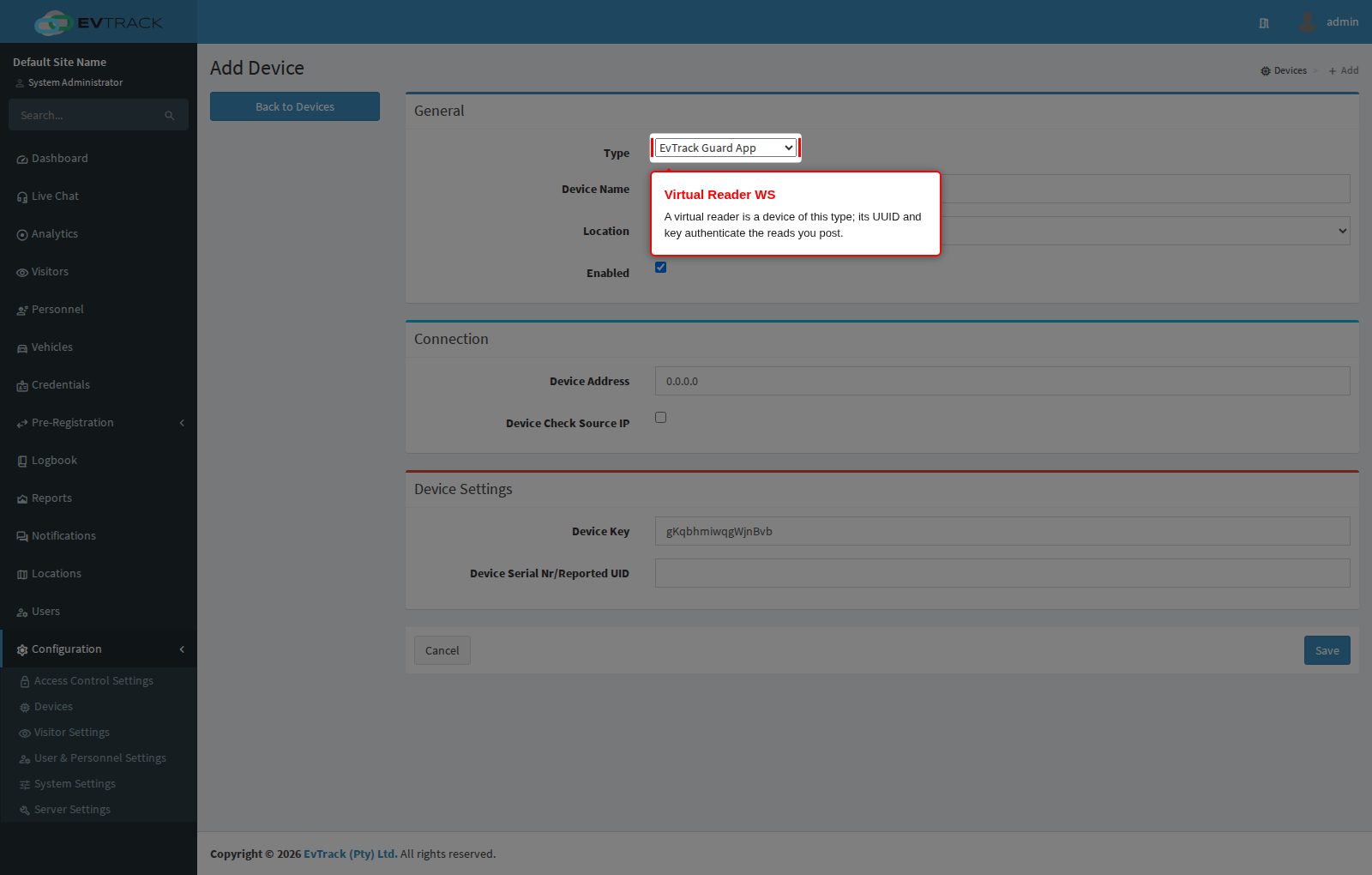
- Open Configuration > Access Control Settings > Devices and click Add.
- Choose the device type Virtual Reader WS. The device is created with one reader, named Virtual Reader.
- Save, then note the device’s UUID and its key. Those two values are the credentials your software will send.
- Attach that reader to an access control point, exactly as you would a physical reader. Until this is done every read answers
424, because there is no point for the reader to open.
Submit a read
POST /api/ws/v1/virtual/reader
POST /api/ws/v1/virtual/qr-code-reader
Content-Type: application/json
Both paths behave identically; the second exists so an integration that only ever submits QR codes can say so in its configuration. Authentication is the device UUID and key inside the body. The Authorization header is not used here.
| Field | Type | Notes |
|---|---|---|
uuid | UUID | Required. The virtual reader device’s identifier |
key | text | Required. The device key, 10 to 64 characters |
code | text | Required. The credential that was read: a card serial number, a QR code, or a barcode. Up to 32 characters |
curl -X 'POST' \
  'https://service.evtrack.com/api/ws/v1/virtual/reader' \
  -H 'Content-Type: application/json' \
  -d '{
  "uuid": "3f6b1c2d-9a54-4c11-8f30-0123456789ab",
  "key": "s3cr3t-device-key-32-chars-long",
  "code": "d617278d"
}'
{
  "code": "200",
  "reason": "granted",
  "message": "200 - Access Granted"
}
| Code | Meaning |
|---|---|
200 | Access granted. The event is written and any configured relay fires |
401 | Access denied. The credential exists but is not allowed here, is outside its validity window, or is not in the database at all. The denial is recorded, exactly as a physical reader’s would be |
404 | The device UUID is unknown or the key does not match. Repeated failures throttle the caller quickly |
415 | The credential needs a second factor, which this interface cannot supply |
422 | Missing uuid, key or code, a key outside 10 to 64 characters, or a code longer than 32 characters |
424 | The reader is not attached to any access control point |
429 | Too many requests from this device |
A denial is a normal, expected answer, not a fault: an unknown code returns 401 and is logged so it appears in reports as an attempted entry. Do not retry a 401.
Pre-load the valid codes
POST /api/ws/v1/virtual/reader/list
POST /api/ws/v1/virtual/qr-code-reader/list
Content-Type: application/json
Returns every credential currently valid at this reader, so a device that must keep working while the network is down can decide locally. Send only the device uuid and key.
[
  {
    "uuid": "1c9b1c2d-0000-4000-8000-0123456789ab",
    "holderType": "VISITOR",
    "holderUuid": "b793da5f-476c-4f54-9eb5-daa4db21d70d",
    "holderName": "Alexander Grant",
    "status": "ACTIVE",
    "active": "2026-07-07T08:00:00.000+00:00",
    "expiry": "2026-07-07T17:00:59.000+00:00",
    "type": "QR_CODE",
    "code": "d617278d",
    "pin": null,
    "useLimit": null
  }
]
Each entry carries who the credential belongs to, what kind it is, the exact window it is valid for, and how many times it may still be used. Refresh the list on a schedule; a code issued after your last refresh will not be in it, so fall back to a live read whenever the network is available.
| Code | Meaning |
|---|---|
200 | The array of valid credentials. An empty array means nothing is currently valid here |
404 | Unknown device UUID or wrong key |
422 | Missing uuid, or a key outside 10 to 64 characters |
429 | Too many requests from this device |