Webhook Integration Overview
EvTrack’s Webhook Integration allows you to automatically send visit or visitor event data (e.g., Visit Created, Visitor Check-in, etc.) to external HTTP/REST endpoints. This enables real-time notifications to your external systems whenever key events occur in EvTrack.
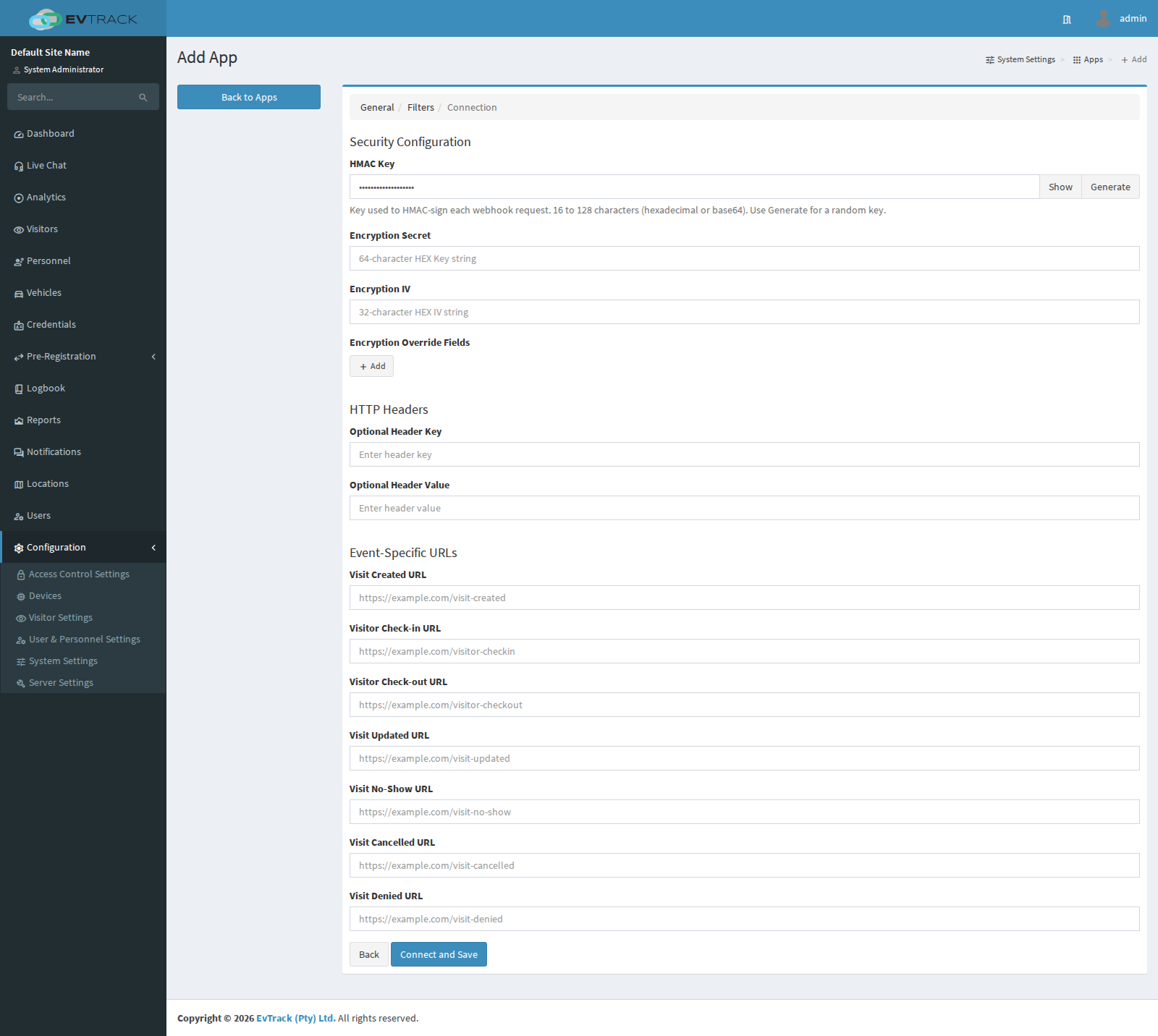
When you create or edit a Webhook Integration, you can configure:
- Security Configuration (HMAC Key, Encryption Secret, Encryption IV)
- Optional HTTP Header (a single key/value pair, for Basic Auth, JWT, etc.)
- Event-Specific URLs (e.g., Visit Created URL, Visitor Check-in URL, etc.)
1. Configuring the Webhook
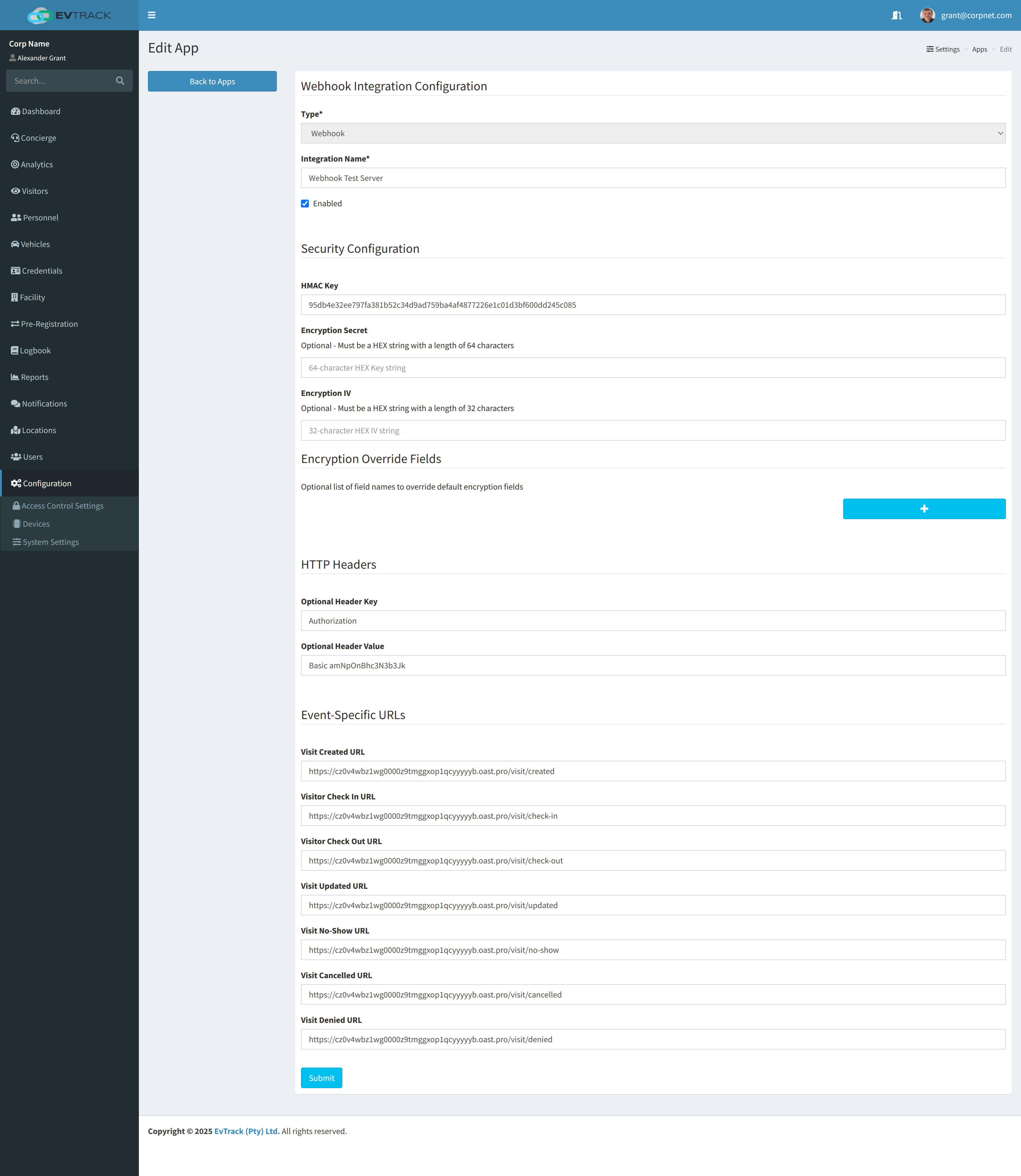
- Integration Name: Provide a descriptive name (e.g., “Webhook Test Server”).
- Enabled: Check this box to enable the integration.
- HMAC Key: (Optional) a shared secret of 16-128 printable characters (the Generate button produces a 64-character hex key) used to generate/verify an HMAC-SHA256 signature.
- Encryption Secret: (Optional) 64-character HEX string for AES-256 encryption (32 bytes).
- Encryption IV: (Optional) 32-character HEX string for AES-256 encryption IV (16 bytes).
- Encryption Override Fields: (Optional) Comma-separated list of fields to encrypt/decrypt (overriding default field list).
- Optional HTTP Header: Add one custom header (a single key/value pair), such as for Basic Auth or a JWT token.
- Event-Specific URLs: Specify the endpoint for each event type (Visit Created, Visitor Check-in, etc.).
After saving, EvTrack will begin sending JSON payloads to the specified event URLs whenever those events occur.
2. HMAC Security
2.1 How HMAC Works
If you configure an HMAC Key under Security Configuration, EvTrack will include two additional HTTP headers in each request:
X-EVTRACK-HMAC-SHA256: Base64-encoded HMAC-SHA256 signatureX-EVTRACK-HMAC-TIMESTAMP: Timestamp (in milliseconds) used in the signature
Below is the actual signature-generation logic from EvTrack:
```String timestamp = String.valueOf(System.currentTimeMillis()); String source = path + timestamp + payload; // Concatenate path + timestamp + payload
Mac mac = Mac.getInstance(“HmacSHA256”); SecretKeySpec secretKeySpec = new SecretKeySpec(hmacKey.getBytes(StandardCharsets.UTF_8), “HmacSHA256”); mac.init(secretKeySpec); byte[] hmacBytes = mac.doFinal(source.getBytes(StandardCharsets.UTF_8));
// Then the base64-encoded HMAC is placed in the X-EVTRACK-HMAC-SHA256 header, // and the timestamp is placed in the X-EVTRACK-HMAC-TIMESTAMP header.`
-   **`path`**: The path portion of the URL (e.g., `"/visit/created"` if the configured endpoint is `https://yourserver.com/visit/created`).
-   **`timestamp`**: Milliseconds since epoch (e.g., `System.currentTimeMillis()`).
-   **`payload`**: The raw JSON string EvTrack sends in the request body.

The final Base64-encoded signature is sent as the value of `X-EVTRACK-HMAC-SHA256`, and the timestamp is sent in `X-EVTRACK-HMAC-TIMESTAMP`.

* * * * *

### 2.2 Verifying the HMAC (Decoding Example)

To verify the HMAC, you must replicate the exact concatenation order (`path + timestamp + payload`) and use the same secret key. Below is a simple **Python** example showing how you might verify the HMAC:

```import base64
import hashlib
import hmac

# Received from EvTrack headers:
received_hmac_b64 = request.headers.get("X-EVTRACK-HMAC-SHA256")
received_timestamp = request.headers.get("X-EVTRACK-HMAC-TIMESTAMP")

# The path portion of the URL the request was sent to, e.g. "/visit/created"
path = "/visit/created"

# The raw JSON payload (as a string)
payload = request.get_data(as_text=True)

# Your HMAC key from EvTrack (hex or raw string, depending on your setup)
hmac_key = "95db4e32ee797fa381b52c34d9ad759ba4af4877226e1c01d3bf600dd245c085"

# Build the source string in the same order:
source = path + received_timestamp + payload

# Compute the HMAC using HmacSHA256
computed_hmac = hmac.new(
    hmac_key.encode("utf-8"),
    source.encode("utf-8"),
    hashlib.sha256
).digest()

computed_hmac_b64 = base64.b64encode(computed_hmac).decode("utf-8")

# Compare signatures (timing-safe comparison recommended)
if hmac.compare_digest(received_hmac_b64, computed_hmac_b64):
    print("HMAC is valid.")
else:
    print("HMAC verification failed!")`
Replay Protection:
You can also compare the received_timestamp (in X-EVTRACK-HMAC-TIMESTAMP) to the current system time and reject requests that are too old (e.g., older than 5 minutes).
3. Adding Basic Auth via the Optional Header
If your external service requires Basic Auth, you can provide it through the Optional HTTP Header (one key/value pair). For example:
- Optional Header Key:
Authorization - Optional Header Value:
Basic dXNlcm5hbWU6cGFzc3dvcmQ=
This value dXNlcm5hbWU6cGFzc3dvcmQ= is the Base64-encoded form of username:password. EvTrack will then include this header in every request it sends to your remote endpoint.
Authorization: Basic dXNlcm5hbWU6cGFzc3dvcmQ=
4. Adding JWT via the Optional Header
If your remote service requires a JWT (JSON Web Token), you can also configure it as the Optional HTTP Header key/value pair:
- Optional Header Key:
Authorization - Optional Header Value:
Bearer <your-jwt-token>
Authorization: Bearer eyJhbGciOiJIUzI1NiIsInR5cCI6IkpXVCJ9...
EvTrack will include this header in every request, allowing your remote endpoint to validate the JWT token.
5. Encryption Override Fields
EvTrack can automatically encrypt certain fields in the JSON payload if you configure the Encryption Secret and Encryption IV. By default, EvTrack has a predefined set of fields it encrypts and decrypts. However, if you specify Encryption Override Fields, only those fields will be encrypted (and decrypted on incoming requests), ignoring the default list.
- Location: In the Edit App screen, under Encryption Override Fields, add a comma-separated list of the fields you want to encrypt.
- Example:
email,mobileNumber,reason - Behavior:
- If Encryption Override Fields is empty, EvTrack uses the default encryption list.
- If Encryption Override Fields is provided, only those fields are encrypted.
Note: You must ensure your receiving system can correctly handle and decrypt those fields if it needs the original values. If you do not need to override the default encryption list, simply leave this field blank.
6. Event-Specific URLs
EvTrack allows you to specify different endpoints for different events:
- Visit Created URL
- Visitor Check-in URL
- Visitor Check-out URL
- Visit Updated URL
- Visit No-Show URL
- Visit Cancelled URL
- Visit Denied URL
When any of these events occur, EvTrack will POST a JSON payload to the corresponding URL. For example, if you configure:
Visit Created URL: https://yourserver.example.com/visit/created
EvTrack will send a POST request to https://yourserver.example.com/visit/created whenever a new visit is created.
Example Webhook Request
Below is a truncated example of the request sent by EvTrack when a Visit Created event occurs:
```POST /visit/created HTTP/1.1 Host: yourserver.example.com Accept: application/json Authorization: Basic dXNlcm5hbWU6cGFzc3dvcmQ= Content-Type: application/json; charset=utf-8 X-EVTRACK-HMAC-SHA256: fsM+a//Y5QSr9zbFc/tvXTllUTyJ5JL+bnKplOOSJv8= X-EVTRACK-HMAC-TIMESTAMP: 1740748010406
{ “status”: “VISIT_CREATED”, “visitId”: “e1477832-2afa-49f7-b621-e662c2e61d25”, “reason”: “acnc1dDJUvMSLaN/tSsaEg==”, “accessCode”: “LEe+QCSNVM+WH9q4kjS7Rg==”, … }
Depending on your **Encryption Override Fields** settings, certain fields (like `reason`, `accessCode`, `email`, etc.) may appear as encrypted Base64-encoded data.

* * * * *

Summary
-------

-   **Webhook Integration** automates sending event data to your external endpoints.
-   **HMAC Key**: Provides integrity verification. Use `X-EVTRACK-HMAC-SHA256` and `X-EVTRACK-HMAC-TIMESTAMP` to verify each request. The signature is generated from `path + timestamp + payload`.
-   **Encryption**:
    -   Optional AES-256 (CBC) encryption for sensitive fields using **Encryption Secret** and **Encryption IV**.
    -   Use **Encryption Override Fields** if you need to replace the default encryption list entirely.
-   **Optional Header**: Configure one additional header key/value pair (e.g., Basic Auth or JWT) for authentication with your remote service.
-   **Event-Specific URLs**: Customize endpoints for each event type (Visit Created, Visitor Check-in, etc.).

With this setup, you can securely and reliably integrate EvTrack's visitor and visit events into your external applications, CRMs, or custom dashboards.


Annex: JSON Schemas
------------

The webhook payload is defined using the following schemas:

### VisitDTO

The main payload for a visit.\
**Fields:**

| Field | Type | Format | Enum/Description |
| --- | --- | --- | --- |
| status | string | -- | Allowed values: `VISIT_CREATED`, `VISITOR_CHECK_IN`, `VISITOR_CHECK_OUT`, `VISIT_UPDATED`, `VISIT_NO_SHOW`, `VISIT_CANCELLED`, `VISIT_DENIED`, `VISITOR_ON_SITE`, `VISITOR_IN_PARKING`, `VISITOR_HOSTED` |
| source | string | -- | Allowed values: `WALKED_IN`, `INVITED`, `PRE_REGISTERED`, `CONCIERGE`, `TEMPORARY_VISITOR_PERMIT` |
| visitId | string | uuid | Unique identifier for the visit (UUID format) |
| expectedAt | string | date-time | Expected time of arrival |
| leavingAt | string | date-time | Expected leaving time |
| arrivedAt | string | date-time | Actual arrival time |
| leftAt | string | date-time | Time the visit ended; can be null |
| reason | string | -- | Reason for the visit |
| type | string | -- | Allowed values: `PIN`, `QR_CODE`, `OTHER` |
| accessCode | string | -- | Access code for the visit |
| qrCodeUrl | string | -- | URL of the QR Code |
| inviteLink | string | -- | Invitation link |
| inviteTextMessage | string | -- | Invitation text message |
| visitor | VisitorDTO | -- | Visitor details (see below) |
| host | HostDTO | -- | Host details (see below) |

### VisitorDTO

Details about the visitor.\
**Fields:**

| Field | Type | Format | Description |
| --- | --- | --- | --- |
| id | integer | int64 | Visitor identifier |
| uuid | string | uuid | Visitor UUID |
| uuid32 | string | -- | 32-character unique identifier |
| initials | string | -- | Visitor initials |
| firstName | string | -- | Visitor first name |
| middleName | string | -- | Visitor middle name |
| lastName | string | -- | Visitor last name |
| identityNumber | string | -- | Visitor identity number |
| mobileNumber | string | -- | Visitor mobile number |
| email | string | -- | Visitor email address |
| company | string | -- | Visitor company name |
| thumbnail | string | -- | URL or Base64-encoded thumbnail image |
| photo | string | -- | URL or Base64-encoded photo |
| nationality | string | -- | Visitor nationality |
| countryOfIssue | string | -- | Country where the identity was issued |

### HostDTO

Details about the host.\
**Fields:**

| Field | Type | Format | Description |
| --- | --- | --- | --- |
| id | integer | int64 | Host identifier |
| uuid | string | uuid | Host UUID |
| uuid32 | string | -- | 32-character unique identifier |
| initials | string | -- | Host initials |
| firstName | string | -- | Host first name |
| lastName | string | -- | Host last name |
| mobileNumber | string | -- | Host mobile number |
| homeNumber | string | -- | Host home number |
| officeNumber | string | -- | Host office number |
| email | string | -- | Host email address |
| unitAddress | string | -- | Host unit address |
| organisation | string | -- | Host organisation |
| location | string | -- | Host location |
| department | string | -- | Host department |
| group | string | -- | Host group |

* * * * *

Example JSON Payload
--------------------

Below is an example of a webhook JSON payload sent when a visit is created:

```{
  "status": "VISIT_CREATED",
  "source": "WALKED_IN",
  "visitId": "e1477832-2afa-49f7-b621-e662c2e61d25",
  "expectedAt": "2025-02-28T00:00:00.000+0200",
  "leavingAt": "2025-02-28T23:59:59.000+0200",
  "arrivedAt": "2025-02-28T15:06:49.537+0200",
  "leftAt": null,
  "reason": "Visitor arrived early",
  "type": "QR_CODE",
  "accessCode": "LEe+QCSNVM+WH9q4kjS7Rg==",
  "qrCodeUrl": "https://example.com/qrcode.png",
  "inviteLink": "https://example.com/invite",
  "inviteTextMessage": "Welcome! Please check in at the reception.",
  "visitor": {
    "id": 1234567890,
    "uuid": "b1d34d40-1234-5678-90ab-cdef12345678",
    "uuid32": "b1d34d401234567890abcdef12345678",
    "initials": "JD",
    "firstName": "John",
    "middleName": "A",
    "lastName": "Doe",
    "identityNumber": "1234567890123",
    "mobileNumber": "+1234567890",
    "email": "john.doe@example.com",
    "company": "Example Corp",
    "thumbnail": "https://example.com/thumbnail.jpg",
    "photo": "https://example.com/photo.jpg",
    "nationality": "USA",
    "countryOfIssue": "USA"
  },
  "host": {
    "id": 987654321,
    "uuid": "c2f34d50-1234-5678-90ab-cdef12345678",
    "uuid32": "c2f34d501234567890abcdef12345678",
    "initials": "SM",
    "firstName": "Sarah",
    "lastName": "Miller",
    "mobileNumber": "+10987654321",
    "homeNumber": "+10987654321",
    "officeNumber": "+10987654321",
    "email": "sarah.miller@example.com",
    "unitAddress": "Suite 101, Example Building",
    "organisation": "Example Corp",
    "location": "Main Office",
    "department": "Sales",
    "group": "Group A"
  }
}
Additional Notes
- Date-Time Formats: All date-time fields follow the ISO 8601 format.
- Enumerated Fields:
status: Must be one ofVISIT_CREATED,VISITOR_CHECK_IN,VISITOR_CHECK_OUT,VISIT_UPDATED,VISIT_NO_SHOW,VISIT_CANCELLED,VISIT_DENIED,VISITOR_ON_SITE,VISITOR_IN_PARKING, orVISITOR_HOSTED.source: Must be one ofWALKED_IN,INVITED,PRE_REGISTERED,CONCIERGE, orTEMPORARY_VISITOR_PERMIT.type: Must be one ofPIN,QR_CODE, orOTHER.
- Validation: Ensure that the payload adheres strictly to the defined schema to avoid ingestion errors.
- Extensibility: The payload structure is extensible; additional fields may be added in future API versions.
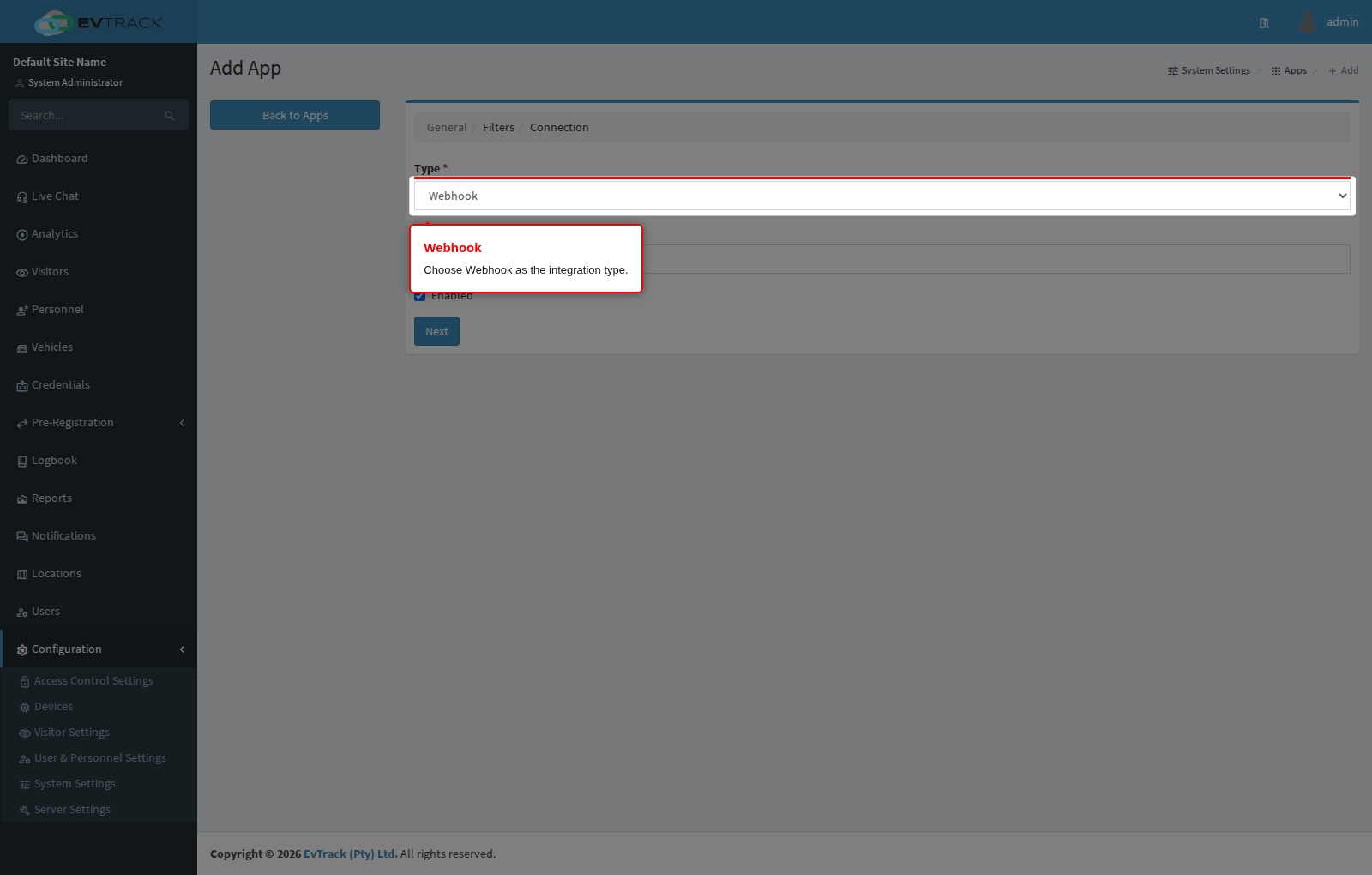
Configuring a webhook app
Webhook delivery is configured as an integration app under Configuration > System Settings > Apps - choose Webhook in the catalogue, then provide a target URL per event and the HMAC key used to sign payloads. Editing and deleting the app happens from the same Apps list. See the Integrations > Webhooks page for the full walkthrough.