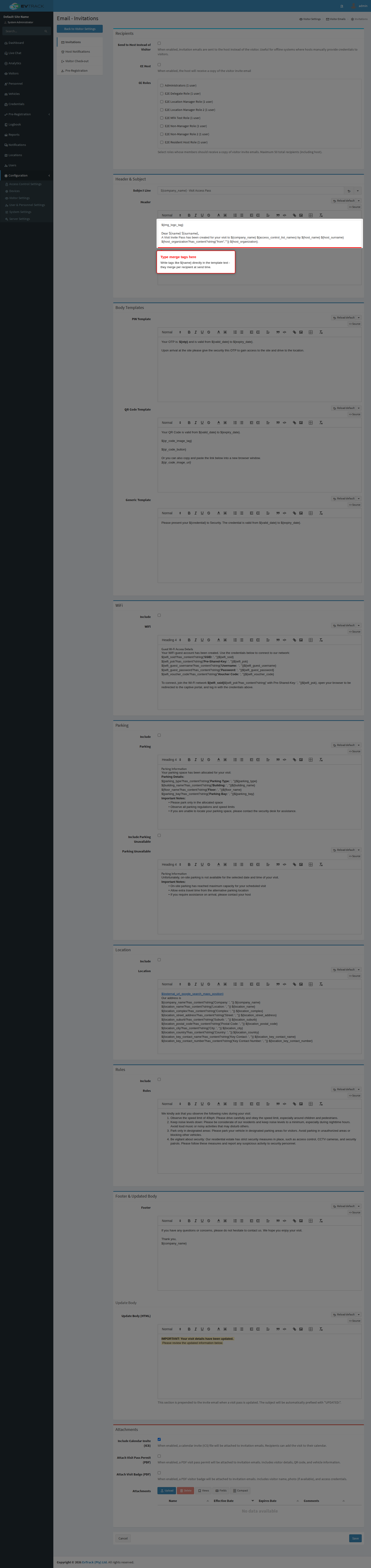
This is the complete reference of the merge tags (data fields) that can be used in email, SMS and messaging templates to dynamically insert visitor, host and system information.
How to Use Merge Tags
Merge tags are placeholders that get replaced with actual data when messages are sent. Use the format ${tag_name} in your templates.
Example:
Dear ${name} ${surname},
Your visit to ${company_name} has been confirmed for ${valid_date}.
Key behaviour to know before designing templates:
- A tag that is not populated for a message type renders as empty text, never an error. Every message type fills only the tags relevant to its trigger - see Tag availability by message type below and design each template against the set its type actually provides.
- Tags are case-sensitive: write them exactly as listed.
- Templates support conditional logic. Wrap optional content so empty values do not leave stray labels, for example:
${wifi_ssid?has_content?string('WiFi network: ' + wifi_ssid, '')}or an<#if wifi_ssid?has_content> ... </#if>block. The shipped default templates use this pattern heavily - load a default template (see Editing templates) to see working examples. - Date and time tags render in the system’s configured timezone (Configuration > Settings > Region), not the recipient’s device timezone.
- HTML-producing tags (
${img_logo_tag},${qr_code_image_tag},${qr_code_button},${groupMembersList}) are for HTML email templates only - never use them in SMS templates.
Reference List of Available Merge Tags
Company and System
Populated for every message type.
| Merge Tag | Description | Example Value |
|---|---|---|
${company_name} | Company/site name; when the location of the visit or registration has its own company name (its Advanced tab, Inherited unticked), it is used in every email about that visit or registration and in the host’s check-in/check-out text message | EvTrack Labs |
${company_contact_number} | Company main contact number | +1-555-1000 |
${app_base_url} | Application base URL | https://app.evtrack.com |
${img_logo_tag} | Company logo as an embedded HTML image (email only); a location with its own email logo (its Invite Email tab) uses it in every email about its visits and registrations | <img src="cid:logo" /> |
Visitor Information
| Merge Tag | Description | Example Value |
|---|---|---|
${name} | Visitor’s first name | Alexander |
${surname} | Visitor’s last name | Grant |
${email} | Visitor’s email address | alexander.grant@evtrack.com |
${mobileNumber} | Visitor’s mobile phone number | +1-555-0123 |
${visitorCompany} | Name of visitor’s company | EvTrack Labs |
${visitorCheckStatus} | Current check-in / check-out status | Checked-in |
${identityNumber} | Visitor’s identity/ID number | 123456789 |
Host Information
| Merge Tag | Description | Example Value |
|---|---|---|
${host_name} | Host’s first name | John |
${host_surname} | Host’s last name | Smith |
${host_email} | Host’s email address | john.smith@company.com |
${host_tel_mobile} | Host’s mobile phone number | +1-555-0456 |
${host_tel_office} | Host’s office phone number | +1-555-1000 |
${host_tel_ext} | Host’s phone extension | 234 |
${host_tel_home} | Host’s home phone number | +1-555-0789 |
${host_unit_address} | Host’s unit/office address | Suite 400, Floor 4 |
${host_organization} | Host’s organization/company | Engineering Division |
${host_department} | Host’s department | Software Development |
${host_group} | Host’s group/team | Platform Team |
Visit Details
| Merge Tag | Description | Example Value |
|---|---|---|
${reason} | Reason for the visit | Business Meeting |
${valid_date} | Visit start date and time | 2026-01-20 09:00:00 |
${expiry_date} | Visit end date and time | 2026-01-20 17:00:00 |
${valid_date_iso} | Visit start date (ISO format) | 2026-01-20 |
${expiry_date_iso} | Visit end date (ISO format) | 2026-01-20 |
${valid_time_iso} | Visit start time | 09:00 |
${expiry_time_iso} | Visit end time | 17:00 |
${event_date} | Event/notification timestamp | 2026-01-20 08:45:00 |
${personal_message} | Personal message from host (pre-registration invitations) | Looking forward to our meeting |
${multiple_entries_enabled} | Multiple entries allowed (YES/NO) | YES |
${multiple_entries_description} | Description of entry permissions | Multiple Entries |
${visiting_context_overview} | Compact “company - location - host” summary, built for SMS and subject lines (pre-registration) | EvTrack Labs - Head Office - John Smith |
Credential Information
| Merge Tag | Description | Example Value |
|---|---|---|
${credential} | Type of credential issued | QR Code |
${otp} | One-Time Password/PIN code | 123456 |
${qr_code_image_url} | URL to download the QR code image | https://axqr.me/3jaxKF |
${qr_code_image_tag} | HTML img tag for the embedded QR code (email only) | <img src="cid:qr123" /> |
${qr_code_button} | HTML call-to-action button (email only); in invitations it reads “Get QR Code”, in pre-registration invitations it reads “Start Registration” and opens the registration form | <a href="...">Get QR Code</a> |
${access_control_list_names} | List of assigned access control lists | Main Entrance, Parking, Floor 4 |
Access Control and Movement
| Merge Tag | Description | Example Value |
|---|---|---|
${accessPoint} | Access control point/door name | Main Entrance |
${direction} | Direction of movement | IN or OUT |
${directionAction} | Action text based on direction | arrived or departed |
${approval_request_url} | Host approval action link (approval requests) | https://app.evtrack.com/a/… |
Location Information
| Merge Tag | Description | Example Value |
|---|---|---|
${location_name} | Name of the location/building | Corporate Headquarters |
${location_complex} | Complex/campus name | Technology Park |
${location_street_address} | Street address | 123 Business Avenue |
${location_suburb} | Suburb/neighborhood | Downtown |
${location_postal_code} | Postal/ZIP code | 12345 |
${location_city} | City name | San Francisco |
${location_state_province} | State or province | California |
${location_country} | Country | United States |
${location_key_contact_name} | Location contact person name | Reception Desk |
${location_key_contact_number} | Location contact phone number | +1-555-2000 |
${gps_latitude} | GPS latitude coordinate (only when the location has coordinates) | 37.7749 |
${gps_longitude} | GPS longitude coordinate (only when the location has coordinates) | -122.4194 |
${external_url_google_search_maps_position} | Directions link: the location’s custom map URL when set, otherwise a Google Maps search link built from the coordinates | https://maps.google.com/… |
In invitations, when a visit has no location of its own, the location tags fall back to the host’s own location. Host notifications and the check-out follow-up fill the location tags from the visit’s own location only; a visit without a location leaves them empty.
WiFi Details
Only populated when guest WiFi access was provisioned for the visit.
| Merge Tag | Description | Example Value |
|---|---|---|
${wifi_ssid} | WiFi network name (SSID) | Guest-WiFi |
${wifi_psk} | WiFi password/pre-shared key | Welcome2026 |
${wifi_guest_username} | Guest WiFi username | visitor123 |
${wifi_guest_password} | Guest WiFi password | TempPass456 |
${wifi_voucher_code} | WiFi voucher/access code | ABCD-1234 |
Parking Information
Only populated when parking was allocated for the visit.
| Merge Tag | Description | Example Value |
|---|---|---|
${parking_type} | Type of parking allocated | Visitor Parking |
${building_name} | Building name for parking location | Tower A |
${floor_name} | Parking floor/level | Level B2 |
${parking_bay} | Specific parking bay number | V-123 |
Cancellation
Populated in visit cancellation notices.
| Merge Tag | Description | Example Value |
|---|---|---|
${cancellation_reason} | The selected cancellation reason | Host unavailable |
${cancellation_message} | The free-text cancellation message | The meeting has been moved to next week |
Registration and Onboarding Fields
Populated in registration notices to administrators and in user onboarding emails.
| Merge Tag | Description | Example Value |
|---|---|---|
${registration_process_url} | URL to process/approve the registration | https://app.evtrack.com/register |
${title} | Person’s title (Mr/Ms/Dr) | Mr |
${middleName} | Middle name | James |
${company} | Company name (registration) | Tech Solutions Inc |
${unitAddress} | Unit/apartment address | Unit 5A |
${telMobile} | Mobile number (registration) | +1-555-0123 |
${telOffice} | Office number (registration) | +1-555-1000 |
${telHome} | Home number (registration) | +1-555-0789 |
${vehicleLicensePlateNr} | Vehicle registration/plate number | ABC-123 |
${registrationOrganisation} | Organization (registration) | Engineering Dept |
${registrationDepartment} | Department (registration) | IT Services |
${registrationGroup} | Group (registration) | Support Team |
${registrationLocation} | Location (registration) | Building A |
${comments} | Registration comments/notes | Special requirements noted |
${activeDate} | Access active-from date | 2026-01-20 |
${expiryDate} | Access expiry date | 2026-12-31 |
${vEventStart} | Calendar event start | 20260120T090000 |
${vEventEnd} | Calendar event end | 20260120T170000 |
${rejectionReason} | Reason for rejection (if applicable) | Documents incomplete |
${registrationRequireAppAccess} | Whether mobile app access was requested (true/false) | true |
${registrationRequireMobileCred} | Whether a mobile credential was requested (true/false) | false |
${registrationRequireRfidCred} | Whether an RFID card was requested (true/false) | true |
${registrationRequireRfidCredReplacement} | Whether an RFID card replacement was requested (true/false) | false |
${registrationOptionalRequestLprAccess} | Whether license-plate access was requested (true/false) | false |
Group Registrations
Populated in registration notices for group pre-registrations.
| Merge Tag | Description | Example Value |
|---|---|---|
${isGroup} | Whether the registration is a group registration (true/false) | true |
${groupName} | Group registration name | Contractor Team A |
${groupType} | Group registration type | CONTRACTOR |
${groupMembersCount} | Number of members in the group | 12 |
${groupMembersList} | Rendered list of the group’s members (email only) | HTML list |
Account and Security
| Merge Tag | Description | Example Value |
|---|---|---|
${username} | Login username (onboarding email) | alexander.grant |
${password} | Temporary password (onboarding email, when set manually) | TempPass123 |
${password_reset_url} | Password reset link (password reset email) | https://app.evtrack.com/reset/… |
${userName} | Account name (login notification email) | Alexander Grant |
${userEmail} | Account email (login notification email) | alexander.grant@evtrack.com |
${ipAddress} | Client IP address (login notification email) | 203.0.113.10 |
${userAgent} | Browser/device description (login notification email) | Chrome on macOS |
${loginTime} | Login timestamp (login notification email) | 2026-01-20 08:45:00 |
${agreementName} | Agreement/terms name (agreement declined notice) | Visitor Terms and Conditions |
App Links
| Merge Tag | Description | Example Value |
|---|---|---|
${app_ios_url} | iOS App Store URL (onboarding email) | https://apps.apple.com/… |
${app_android_url} | Google Play Store URL (onboarding email) | https://play.google.com/… |
${app_huawei_url} | Huawei AppGallery URL (onboarding email) | https://appgallery.huawei.com/… |
${pre_registration_url} | Pre-registration form link (pre-registration invitations) | https://app.evtrack.com/r/… |
Tag Availability by Message Type
Each message type fills only the tags relevant to its trigger; any other tag renders blank. Design each template against the set its type actually provides:
| Message Type | Trigger | Tags Populated |
|---|---|---|
| Visitor Invitation (email, SMS, WhatsApp) | Visitor invited for a visit | The full set: visitor, host, visit dates, credential/QR, location, WiFi, parking and company tags |
| Pre-Registration Invitation (email, SMS) | Registration invitation sent to a visitor | ${name}, ${surname}, ${email}, ${mobileNumber}, ${host_name}, ${location_name}, ${personal_message}, ${visiting_context_overview}, ${pre_registration_url}, ${qr_code_image_tag}, ${qr_code_button} (as a Start Registration button) |
| Host Notification (email, SMS, push) | Visitor check-in/check-out or status change | Visitor and host basics plus ${visitorCompany}, ${visitorCheckStatus}, ${accessPoint}, ${direction}, ${directionAction}, ${event_date}, ${reason} and the visit’s location tags (email and SMS) |
| Visitor Check-out Follow-Up (email) | After the visitor checks out | Visitor, host and movement tags plus ${email} and the visit’s location tags |
| Host Approval Request (email, SMS, push) | Visitor requires host approval | Visitor basics, ${visitorCompany}, ${accessPoint}, ${reason}, ${approval_request_url} |
| Visit Cancellation (email) | A visit is cancelled | Visitor, host, visit date and location tags plus ${cancellation_reason}, ${cancellation_message} |
| Agreement Declined (email) | A person declines an agreement | ${agreementName} plus the person’s name, mobile number and identity number |
| Registration Notices (email, to administrators) | New registration needs attention | The registration fields plus the group registration tags, ${vEventStart}/${vEventEnd} and ${rejectionReason} |
| User Onboarding (email) | New user account created | The person’s names and contact fields, ${username}, optional ${password}, ${activeDate}/${expiryDate}, the registration request flags and the app store links |
| Password Reset (email) | User requests a password reset | ${password_reset_url} and the company tags |
| Login Notification (email) | Log in to a user account | ${userName}, ${userEmail}, ${ipAddress}, ${userAgent}, ${loginTime} |
${company_name}, ${company_contact_number}, ${app_base_url} and (in emails) ${img_logo_tag} are populated for every type. Movement tags (${accessPoint}, ${direction}, ${directionAction}) exist only in the event-driven notifications - they are never populated in invitations.
How the invitation email is assembled
The invitation email is not one single template - it is assembled from the sections configured under Visitors > Settings > Emails > Invitations, in this order:
- Updated notice - prepended only when an existing invite is re-sent after changes; the subject is also prefixed with
UPDATED: - Header
- Body - the QR code body and/or the PIN body depending on the credentials issued, otherwise the generic body
- WiFi section - only when WiFi was provisioned
- Parking section (or the parking-unavailable section)
- Location section
- Rules section
- Footer
One merged data set is applied to the whole assembled email, so any invitation tag can be used in any section. Locations can override the subject, header, rules and logo for their own invitations - see the location’s Invite Email tab.
SMS and WhatsApp notes
- SMS templates are plain text. Never use the HTML tags. After merging, line breaks are removed, the message is truncated to the configured maximum message parts, and non-standard characters (including accented letters) are converted or dropped by the gateway pipeline - keep SMS templates short and ASCII-simple.
- WhatsApp does not use
${...}merge tags. WhatsApp business templates are pre-approved by the provider and carry numbered variables; EvTrack maps each variable to a source (visitor name, company, start date, end date, access type, reason, location, credential link, and so on) under Configuration > Server Settings > WhatsApp. WhatsApp dates render asdd-MM-yyyyand times asHH:mm. See the SMS and WhatsApp guide for the full setup.
Usage Examples
Example 1: Visitor Invitation Email
Dear ${name} ${surname},

You are invited to visit ${company_name} on ${valid_date}.

Your host ${host_name} ${host_surname} will meet you at ${location_name}.

Location Details:
${location_street_address}
${location_city}, ${location_state_province} ${location_postal_code}

Your access code: ${otp}
Valid from: ${valid_date}
Valid until: ${expiry_date}

${qr_code_image_tag}

Best regards,
${company_name}
Example 2: Host Notification
Dear ${host_name},

Your visitor ${name} ${surname} from ${visitorCompany} has ${directionAction}
at ${accessPoint} (${direction}).

Time: ${event_date}
Reason: ${reason}

Best regards,
${company_name} Security
Example 3: Conditional WiFi and Parking Sections
Dear ${name},

Your visit to ${company_name} is confirmed!

Visit Details:
Date: ${valid_date_iso}
Time: ${valid_time_iso} - ${expiry_time_iso}
Host: ${host_name} ${host_surname}

<#if wifi_ssid?has_content>
WiFi Access:
Network: ${wifi_ssid}
Password: ${wifi_psk}
</#if>

<#if parking_bay?has_content>
Parking:
Location: ${building_name}, ${floor_name}
Bay Number: ${parking_bay}
</#if>

See you soon!
${company_name}
Important Notes
- Conditional fields: WiFi, parking and GPS tags are only populated when those features apply to the specific visit - wrap them in conditional blocks as shown above.
- HTML tags: Tags producing HTML (
${img_logo_tag},${qr_code_image_tag},${qr_code_button},${groupMembersList}) are for HTML email templates only. - Date formats: Use the full date-time tags or the ISO date/time pairs to suit the template; all render in the system timezone configured under Region settings.
- Security: Never include sensitive information like passwords in plain text messages unless specifically required.
- Testing: Always send a test message after editing a template - a mistyped tag saves without error and simply renders empty.
- Validation: Templates are syntax-checked on save; a malformed tag (for example an unclosed
${) is rejected with an error, but an unknown tag name saves fine and renders empty.
Editing templates
Merge tags are used in the notification template editors:
- Invitation emails: Visitors > Settings > Emails > Invitations
- Pre-registration email: Visitors > Settings > Emails > Pre-Registration
- Host notification email: Visitors > Settings > Emails > Host Notifications
- Check-out follow-up email: Visitors > Settings > Emails > Visitor Check-out
- Invitation and movement SMS: Visitors > Settings > Instant Messaging
- Cancellation messages: Visitors > Settings > Cancellation
- User onboarding email: Users > Settings > Onboarding Email
- Password reset email: Configuration > Server Settings > Password
- WhatsApp variable mapping: Configuration > Server Settings > WhatsApp
- Per-location invitation overrides: the location’s Invite Email tab
Every editor has a Reload Default action that restores the shipped template for that field - and where the button offers a language menu, loads the shipped translation instead (12 languages are bundled, including a dual-language layout for email templates that shows English alongside the translation).