Open Configuration > System Settings > Wix Bookings to configure the Wix Bookings connection - bookings made through your Wix site flow into visitor registrations automatically once the integration is enabled.
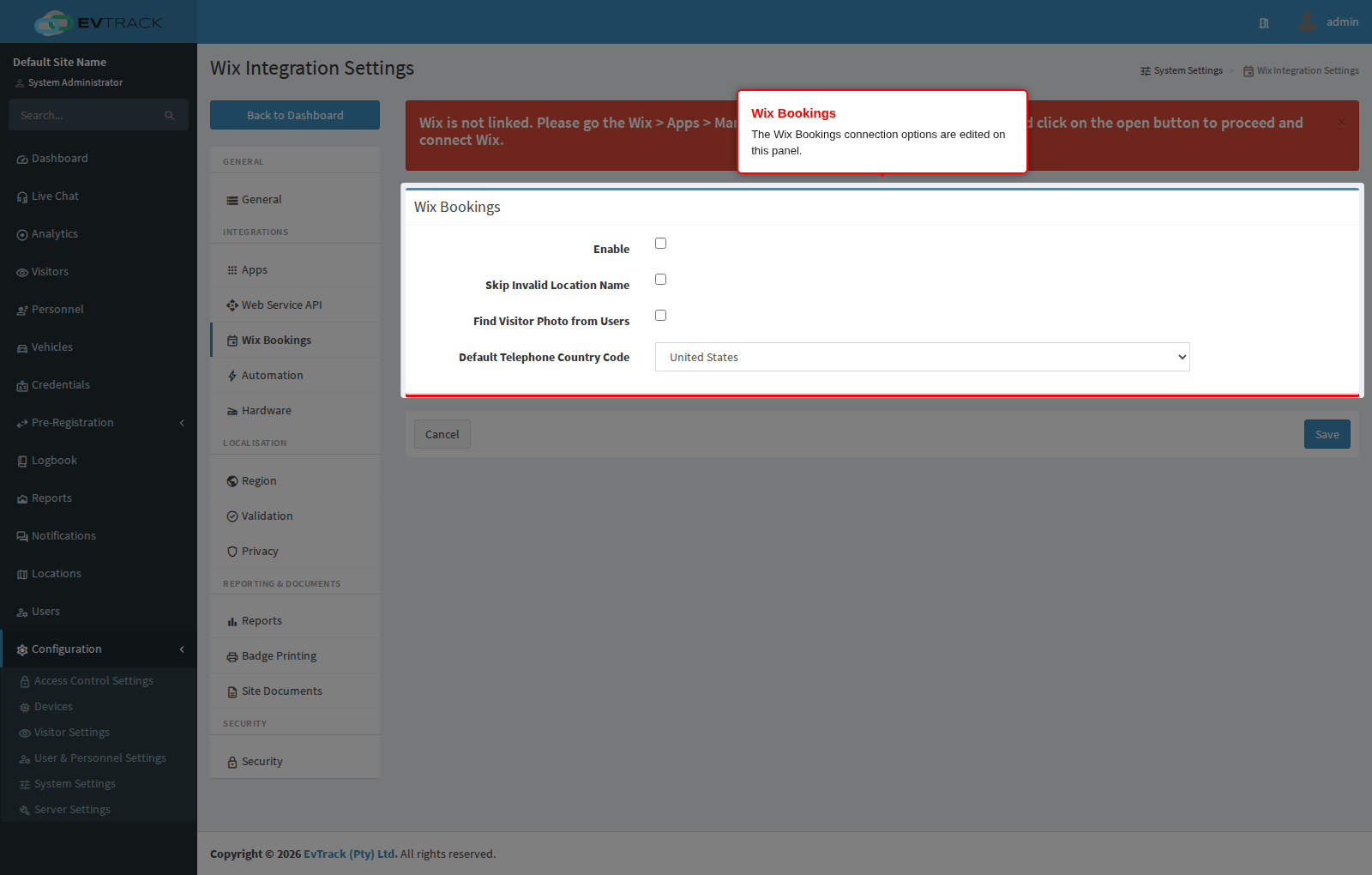
Note: The connection itself is established from your Wix site: install the EvTrack app from the Wix App Market, add it to your site, log in with your EvTrack account, and grant the requested Wix Bookings permissions. Once granted, each booking flows through automatically and the booking visitor receives a temporary access credential (QR code or OTP) by email.
Settings
- Enable - master switch for the Wix integration; turn it on to start receiving Wix bookings as visitor registrations.
- Skip Invalid Location Name - when on, a booking whose location name does not match a location in the system is skipped instead of failing; enable this if your Wix services use names that do not map one-to-one to your locations. When it is off, every booking must name a location that exists in the system with the exact same spelling, otherwise the booking fails and no registration is created.
- Find Visitor Photo from Users - when on, the system looks the booking visitor up in the user records and reuses an existing profile photo for the registration.
- Default Telephone Country Code - the country code applied to booking phone numbers that arrive without an international prefix; set this to the country most of your Wix customers book from.