A visitor invitation is the API’s central record. Creating one registers the visitor, opens a visit with a validity window, issues the visitor’s temporary credential (a QR code or a PIN, depending on your configuration), and returns everything the calling system needs to deliver that credential to the visitor. Every later call about the visit - reading it, changing its dates, cancelling it, checking the visitor in or out - is addressed by the registration ID returned at creation.
This chapter documents the two endpoint families that manage that record:
/api/ws/v1/invites- create, read, list, update, and delete invitations, and read the access events an invitation produced./api/ws/v1/invites/{registrationId}/status- read and change the visit’s status as the visitor arrives, moves through the building, and leaves.
Before you start, read the API overview for the base URL, the Authorization header, date/time handling, pagination, and the shared error codes. Everything below assumes those conventions.
1. Permissions
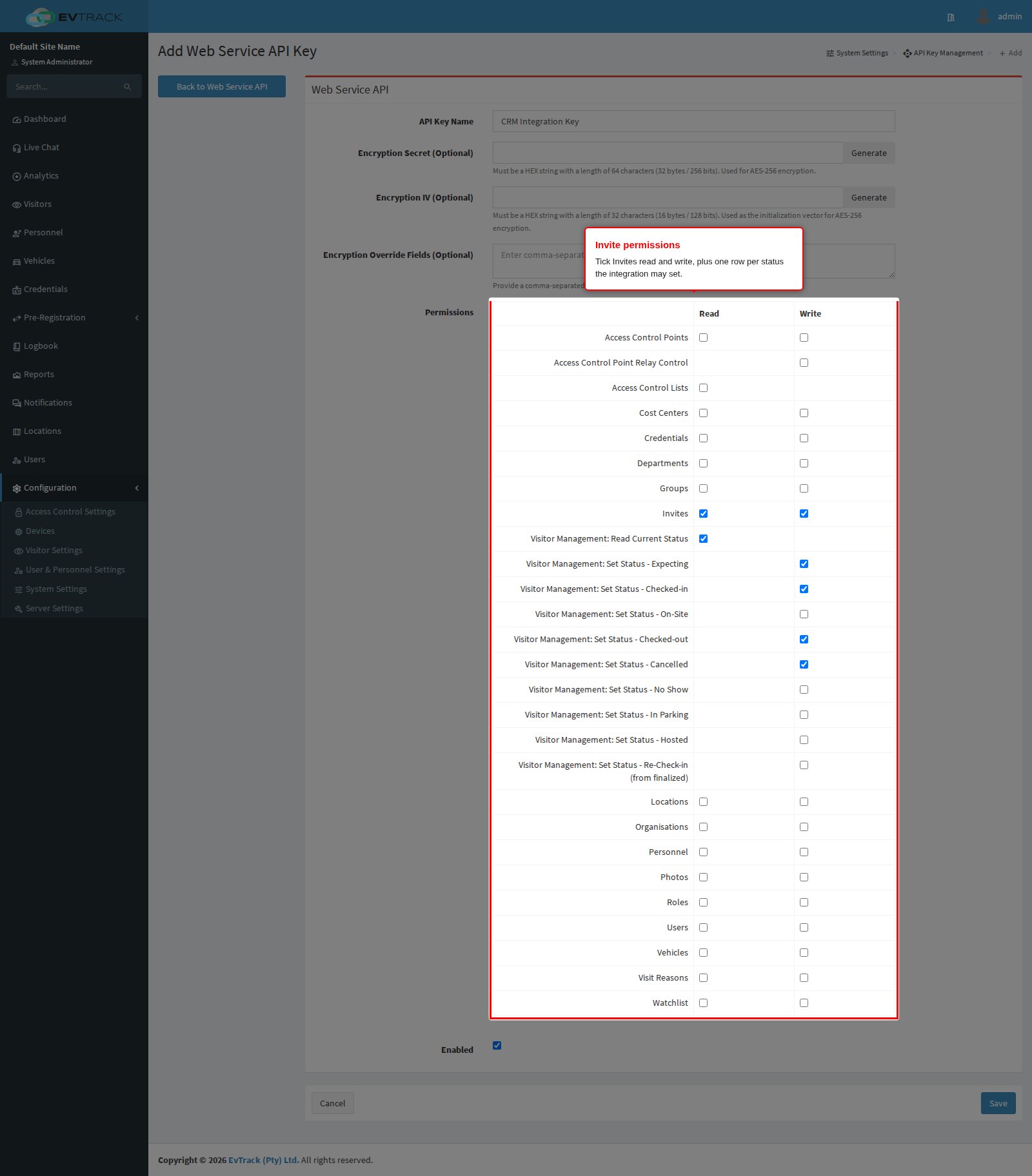
The invitation endpoints need Invites rights on the API key; each status transition has its own separate right, so an integration can be allowed to check visitors in without being allowed to cancel their visits.
| Right on the key | Grants |
|---|---|
| Invites - Read | List invitations, read one, read its access events, find by external reference |
| Invites - Write | Create, update, and delete invitations |
| Visitor Management: Read Current Status | Read the current status of an invitation |
| Visitor Management: Set Status - Expecting | Return a visit to Expecting |
| Visitor Management: Set Status - Checked-in | Check the visitor in |
| Visitor Management: Set Status - On-Site | Mark the visitor on site |
| Visitor Management: Set Status - Checked-out | Check the visitor out |
| Visitor Management: Set Status - Cancelled | Cancel the visit |
| Visitor Management: Set Status - No Show | Mark the visit a no-show |
| Visitor Management: Set Status - In Parking | Mark the visitor in parking |
| Visitor Management: Set Status - Hosted | Mark the visitor hosted |
| Visitor Management: Set Status - Re-Check-in | Re-open a finished visit and check the visitor back in |
A call whose right is not ticked returns 403 and changes nothing.
2. What the settings screens control
Two settings decide whether a payload is accepted at all, so check them before blaming an integration for a 422.
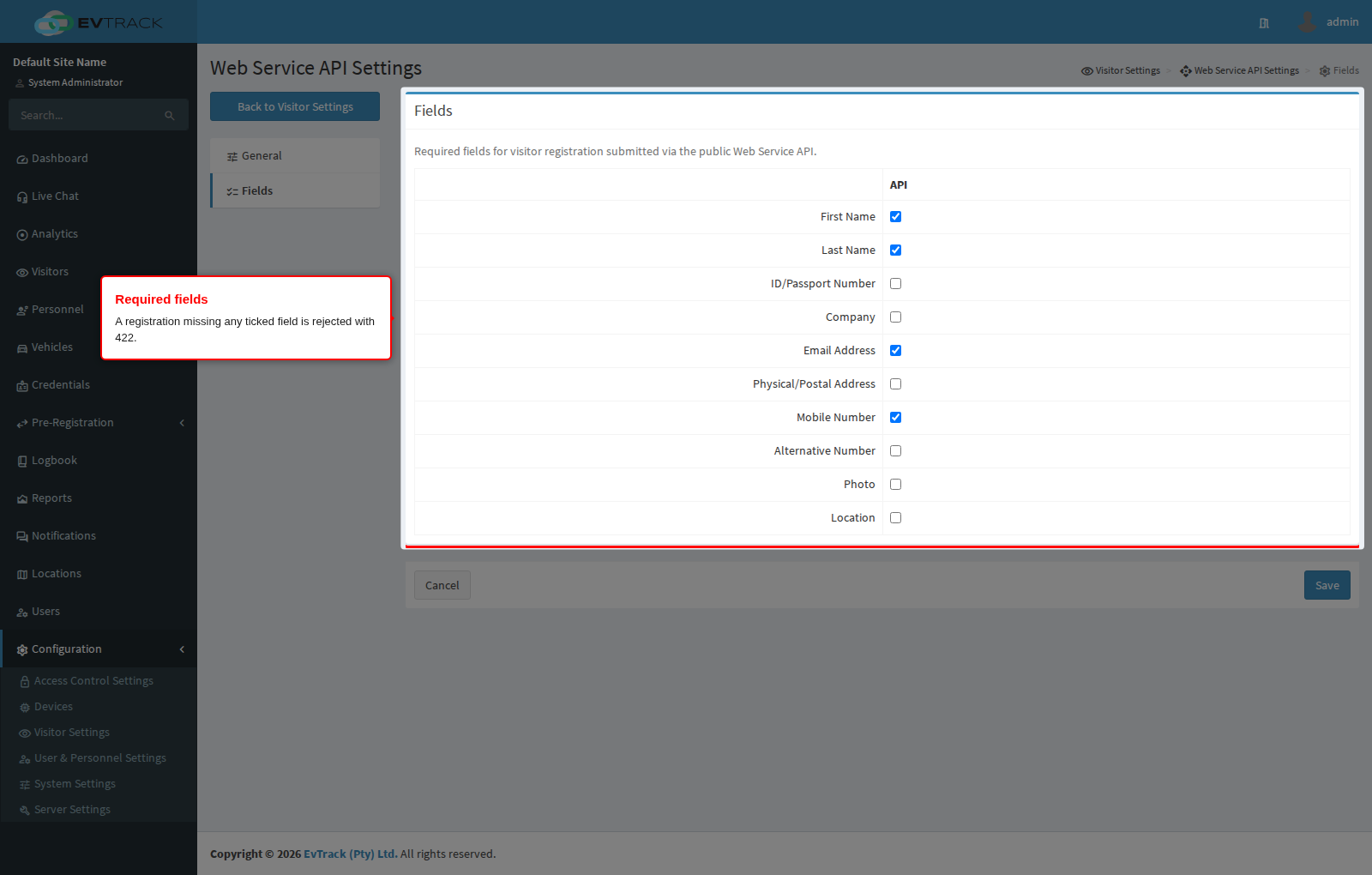
Required fields. Open Configuration > Visitor Settings > Web Service API > Fields. Every field ticked there becomes mandatory for registrations arriving through the API. A payload missing one is rejected with 422 and a message naming the field, for example Missing Field: mobile. Out of the box nothing is ticked, so only the validity window is mandatory.
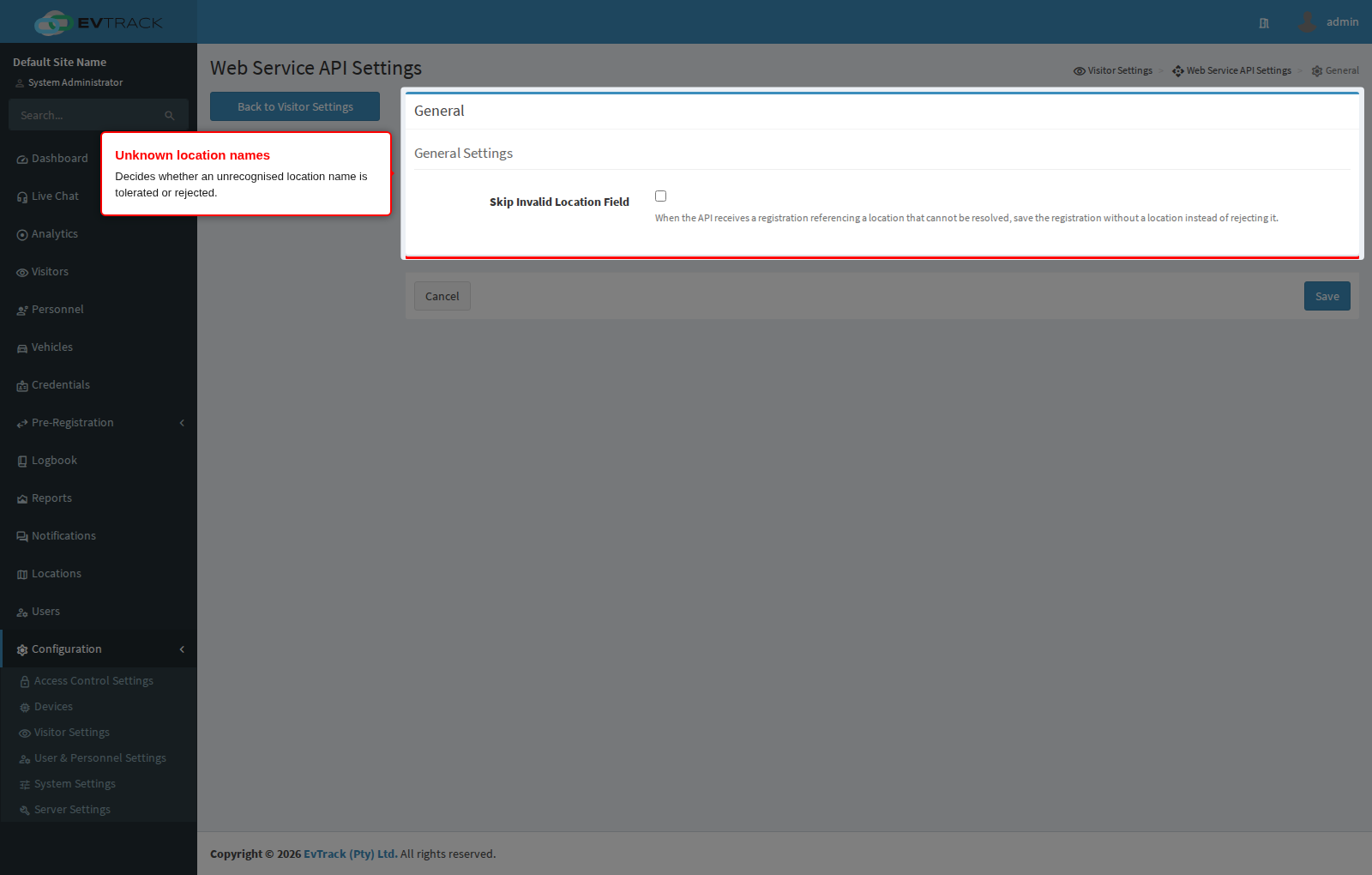
Unknown location names. Open Configuration > Visitor Settings > Web Service API > General. The location field of a payload is matched to a configured location by name. If the name does not match anything, the default behaviour is to reject the call with 422 Invalid Location Name. Tick Skip Invalid Location Field to accept the registration anyway and save it without a location - useful when an upstream system sends free-text site names that do not always match.
3. Endpoint summary
| Method | Path | Purpose |
|---|---|---|
POST | /api/ws/v1/invites | Create an invitation and issue the visitor credential |
GET | /api/ws/v1/invites | List invitations, with filtering and pagination |
GET | /api/ws/v1/invites/{registrationId} | Read one invitation in full |
PUT | /api/ws/v1/invites/{registrationId} | Update an open invitation |
DELETE | /api/ws/v1/invites/{registrationId} | Withdraw an invitation and revoke its credential |
GET | /api/ws/v1/invites/{registrationId}/events | Read the access events the invitation produced |
PUT | /api/ws/v1/invites/{registrationId}/meta-tags | Merge external bookkeeping tags without touching anything else |
GET | /api/ws/v1/invites/by-external-uuid/{externalUUID} | Find invitations by your own reference |
GET | /api/ws/v1/invites/{registrationId}/status/current | Read the current visit status |
POST | /api/ws/v1/invites/{registrationId}/status/expecting | Set status to Expecting |
POST | /api/ws/v1/invites/{registrationId}/status/check-in | Set status to Checked-in |
POST | /api/ws/v1/invites/{registrationId}/status/on-site | Set status to On-Site |
POST | /api/ws/v1/invites/{registrationId}/status/check-out | Set status to Checked-out |
POST | /api/ws/v1/invites/{registrationId}/status/cancel | Set status to Cancelled |
POST | /api/ws/v1/invites/{registrationId}/status/no-show | Set status to No Show |
POST | /api/ws/v1/invites/{registrationId}/status/in-parking | Set status to In Parking |
POST | /api/ws/v1/invites/{registrationId}/status/hosted | Set status to Hosted |
POST | /api/ws/v1/invites/{registrationId}/status/re-check-in | Re-open a finished visit as Checked-in |
4. Create an invitation
POST /api/ws/v1/invites
Content-Type: application/json
Registers or matches the visitor, creates the visit, generates the credential, and answers 201.
Request fields
Only activation and expiry are always mandatory. Any other field becomes mandatory if it is ticked on the Required fields tab described above.
| Field | Type | Notes |
|---|---|---|
activation | date/time | Required. Start of the validity window. Rounded down to the start of its minute |
expiry | date/time | Required. End of the validity window. Rounded up to the last second of its minute |
first_name / firstName | text | Up to 75 characters |
last_name / lastName | text | Up to 75 characters |
identity_number / identityNumber | text | ID or passport number, up to 50 characters |
email | text | Must be a valid address, up to 100 characters |
company | text | Up to 75 characters |
mobile | text | International notation, for example +12125680012, up to 50 characters |
alternative_number / alternativeNumber | text | Second contact number, same format and limit |
address | text | Up to 50 characters |
location | text | The name of a configured location, up to 75 characters |
vehiclePlateNumber | text | Registers the vehicle against the visitor, up to 50 characters |
photo | text | Visitor photo, Base64 encoded JPEG or PNG, up to 1 MB encoded |
idCardPhoto | text | Photo of the identity document, Base64 encoded, up to 1 MB encoded |
hostUser | UUID | The user being visited. Look it up with the user search endpoint |
hostEmail | text | Alternative to hostUser: the host is matched by email address. Used only when hostUser is absent |
visitReason | UUID | A configured visit reason |
predefinedOTP | number | Force a specific PIN instead of a generated one. Between 1000 and 999999 |
predefinedAccessCode | text | Force a specific access code instead of a generated one: 32 or 56 bit HEX (e.g. F3A3B398), as used by QR codes and barcodes. Treated case-insensitively and stored in upper case, so f3a3b398 and F3A3B398 are the same code. Must not already be held by an active credential; a duplicate is rejected with 422. This is how a pass minted on another EvTrack system is checked in here unchanged |
externalUUID | UUID | Your own reference for this visit. Returned on reads and searchable. Creating a second invitation with an externalUUID that still belongs to an open invitation is rejected with 409, and the conflict response carries the existing registrationId so an integration can recover into an update instead |
visit_type / visitType | text | PRE_REGISTERED (default) or TEMPORARY_VISITOR_PERMIT. The permit type requires the temporary visitor permit feature to be enabled |
firstNations | true/false | Optional demographic flag |
peopleOfDetermination | true/false | Optional demographic flag |
externalMetaTags | object | Your own bookkeeping tags for this invite, as key/value pairs of text. See External bookkeeping tags below |
Response fields
| Field | Notes |
|---|---|
code | 201 |
message | created |
registrationId | The invitation’s UUID. Store it: every later call uses it |
visitorId | The visitor record’s UUID. Stable across repeat visits by the same person |
type | Credential issued: QR_CODE, PIN, or OTHER |
accessCode | The credential value: the QR code value, or the PIN when the type is PIN |
pinCode | The PIN, when one was generated |
qrCodeData | The QR code value, when one was generated |
qrCodeBase64 | The QR code rendered as a Base64 PNG image, ready to embed in your own email |
qrCodeUrl | A link that renders the QR code image |
inviteLink | The visitor-facing invitation page |
inviteTextMessage | A ready-made invitation message, suitable for SMS or a chat channel |
externalUUID | Echoes your reference, when one was supplied |
externalMetaTags | Echoes your bookkeeping tags, when any were supplied |
When you supplied predefinedAccessCode and/or predefinedOTP, the response echoes the honoured values back on predefinedAccessCode and predefinedOTP, so you can confirm this system applied the code and PIN you asked for.
The API does not deliver the invitation. No email or message is sent to the visitor by this call. The response deliberately hands you the link, the code, the QR image, and a ready-made message so the calling system can deliver it through its own channel with its own branding. To have EvTrack invite visitors instead, use the Invite Visitor flow in the admin interface.
Example
curl -X 'POST' \
  'https://service.evtrack.com/api/ws/v1/invites' \
  -H 'accept: application/json' \
  -H 'Authorization: <your-api-key>' \
  -H 'Content-Type: application/json' \
  -d '{
  "first_name": "Alexander",
  "last_name": "Grant",
  "email": "alexander.grant@evtrack.com",
  "mobile": "+12125680012",
  "company": "EvTrack Labs",
  "location": "542 Main Street",
  "hostEmail": "reception@evtrack.com",
  "externalUUID": "5ffd3f1c-ed14-453c-bd72-0218a3f6d41f",
  "activation": "2026-07-07T08:00:00.000Z",
  "expiry": "2026-07-07T17:00:00.000Z"
}'
{
  "code": 201,
  "message": "created",
  "registrationId": "57fa54a4-d6a5-4a04-a559-b97d6043dccf",
  "visitorId": "b793da5f-476c-4f54-9eb5-daa4db21d70d",
  "type": "QR_CODE",
  "accessCode": "d617278d",
  "qrCodeData": "d617278d",
  "inviteLink": "https://app.evtrack.com/i/u/57fa54a4-d6a5-4a04-a559-b97d6043dccf",
  "externalUUID": "5ffd3f1c-ed14-453c-bd72-0218a3f6d41f"
}
What can go wrong
| Code | Meaning |
|---|---|
400 | No JSON body, or the credential type configured for visitors needs a field the payload did not supply |
403 | The key has no Invites write right |
409 | This transaction has already been recorded, or the externalUUID already belongs to an open invitation - the response body carries that invitation’s registrationId |
422 | A field failed validation, the window is invalid (expiry not after activation), a required field is missing, the location name is unknown, the host user or visit reason UUID does not exist, the window is longer than the maximum visitor stay duration, the predefined access code is already in use, the predefined OTP is already in use, or the visitor already holds the maximum number of valid credentials |
451 | The visitor matched a watchlist entry. No invitation was created |
5. Read one invitation
GET /api/ws/v1/invites/{registrationId}
Returns the invitation in full, including any custom fields captured for it.
| Field | Notes |
|---|---|
registrationId, visitorId | Identifiers |
firstName, lastName | Visitor name |
activation, expiry | The validity window |
type | QR_CODE, PIN, or OTHER |
accessCode | The credential value |
qrCodeUrl, inviteLink, inviteTextMessage | Delivery material, as on create |
customFields | Array of {fieldId, fieldName, fieldType, value} for any custom registration fields |
externalMetaTags | Your bookkeeping tags for this invite - see External bookkeeping tags |
Returns 404 when the registration ID is unknown.
6. List invitations
GET /api/ws/v1/invites?filter=CURRENT&start=0&limit=100
| Parameter | Default | Notes |
|---|---|---|
filter | CURRENT | CURRENT, ALL, IN, OUT, EXPECTED, CANCELLED, CHECKED_OUT_AUTO |
visitorUUID | none | Restrict to one visitor’s invitations |
start | 0 | Zero-based index of the first row |
limit | 100 | Rows per page, 1 to 1000 |
updatedSince | none | Restrict to invites modified at or after this ISO-8601 instant, for example 2026-08-23T10:00:00Z |
Use IN for visitors currently inside, OUT for those who have left, EXPECTED for arrivals not yet checked in, CANCELLED for cancelled visits, CHECKED_OUT_AUTO for visits the system closed automatically, CURRENT for the live view an operator sees, and ALL for everything.
Incremental sync with updatedSince. Pass the timestamp of your last successful sync to get back only invites that changed since then - creates, updates, and status transitions all count as a modification. This is meant to cut the size of a routine poll, not to replace a full sync: updatedSince cannot surface deletions - a withdrawn invitation stops matching the filters you would normally poll with, so its absence from a later updatedSince page cannot be told apart from “did not change.” Keep taking a periodic full snapshot (a plain filter=ALL poll without updatedSince) to catch withdrawals and anything else an incremental poll would miss. A malformed value answers 422.
Each row carries what a dashboard needs without a second call. When a predefinedAccessCode was supplied for the invitation, the row also carries predefinedAccessCode with the code last applied, and when externalMetaTags were set, the row carries those too:
{
  "entries": [
    {
      "registrationId": "57fa54a4-d6a5-4a04-a559-b97d6043dccf",
      "visitorId": "b793da5f-476c-4f54-9eb5-daa4db21d70d",
      "firstName": "Alexander",
      "lastName": "Grant",
      "company": "EvTrack Labs",
      "activation": "2026-07-07T08:00:00.000+00:00",
      "expiry": "2026-07-07T17:00:59.000+00:00",
      "checkStatus": "CHECKED_IN",
      "checkInTime": "2026-07-07T08:12:04.000+00:00",
      "checkOutTime": null,
      "visitReason": "Meeting",
      "hostFirstName": "Jordan",
      "hostLastName": "Reed",
      "locationName": "542 Main Street"
    }
  ],
  "startIndex": 0,
  "countReturned": 1,
  "totalCount": 1
}
7. Find invitations by your own reference
GET /api/ws/v1/invites/by-external-uuid/{externalUUID}
Returns an array of invitations whose externalUUID matches the value you supplied at creation. This is how a booking system finds the visit it created without having to store EvTrack’s registration ID. The search covers all invitations - including cancelled and completed ones - from 62 days in the past to 365 days into the future. An empty array means nothing matched.
Each entry carries a checkStatus field (for example EXPECTED, CHECKED_IN, CHECKED_OUT, or CANCELLED), so your integration can tell an open invitation from a finished one without a second call.
8. Update an invitation
PUT /api/ws/v1/invites/{registrationId}
Content-Type: application/json
Updates an open invitation: the visitor’s details, the validity window, the location, the visit reason, the photos, and your external reference. Send the complete payload, not only the fields that changed - activation and expiry are mandatory on every update, exactly as on create. The credential already issued keeps its value; changing the window changes when that credential works.
The host and the visit type are set at creation and are not accepted on update. externalMetaTags follows the clear-on-foreign-edit rule described in External bookkeeping tags: include it on this PUT and your tags merge in alongside the rest of the update; leave it out and the whole stored map is cleared, because this call is now a foreign edit as far as your tags are concerned. If the only thing you need to change is tags, use the dedicated PUT .../meta-tags endpoint instead - it never clears.
The predefined codes CAN change on update: sending a different predefinedAccessCode or predefinedOTP replaces the invitation’s credential with one carrying the new code - the old code stops working at the checkpoint immediately. Omit both fields to keep the current credential untouched. Resending the invitation’s own current predefinedAccessCode and predefinedOTP unchanged does not replace the credential either - EvTrack recognises the values as already applied, so no new credential is issued and the existing one keeps working. As on create, the response echoes the honoured values back on predefinedAccessCode and predefinedOTP.
| Code | Meaning |
|---|---|
200 | Updated |
400 | No JSON body |
403 | The key has no Invites write right |
404 | Unknown registration ID, or the visit has already been finished and can no longer be changed |
422 | The same validation failures as on create |
425 | The payload is identical to what is stored, so there was nothing to change. This is the deliberate answer to a client replaying the same update; it is not an error condition to alert on |
9. Withdraw an invitation
DELETE /api/ws/v1/invites/{registrationId}
Withdraws the invitation: the visit is set to Cancelled and the credentials it issued are removed, so the QR code or PIN stops opening anything immediately.
{
  "code": 200,
  "reason": "success",
  "message": "Visitor Registration Deleted Successfully",
  "registrationId": "57fa54a4-d6a5-4a04-a559-b97d6043dccf"
}
The visit record itself is kept. Despite the name, this is a withdrawal, not an erasure: the visit remains in the history and in reports, marked Cancelled, which is what an audit trail requires. It behaves exactly like the cancel transition in section 13, so use whichever reads better in your integration.
Returns 404 for an unknown registration ID, or for a visit that is already finished and therefore has nothing left to withdraw.
10. Read the access events of a visit
GET /api/ws/v1/invites/{registrationId}/events
Returns every access control event the invitation produced, so a calling system can show a visitor’s movements without reading the full logbook.
{
  "code": 200,
  "reason": "success",
  "message": "Visitor Invite Registration Events",
  "registrationId": "57fa54a4-d6a5-4a04-a559-b97d6043dccf",
  "count": 2,
  "events": [
    {
      "transactionUuid": "57fa54a4-d6a5-4a04-a559-b97d6043dccf",
      "datetime": "2026-07-07T08:12:04.000+00:00",
      "type": "EVENT_ACCESS_GRANTED",
      "direction": "IN",
      "description": "Main Entrance"
    }
  ]
}
type is the event kind, for example EVENT_ACCESS_GRANTED or EVENT_ACCESS_DENIED, and direction is IN or OUT. The events returned are those recorded against the credentials this invitation issued, so a visit whose credential was never presented answers with count: 0 and an empty list.
11. External bookkeeping tags
externalMetaTags lets your integration stamp its own bookkeeping tags onto an invite - a sync cursor, a source-system identifier, a “last pushed” marker - without EvTrack reading or acting on any of it. The server stores the map, echoes it back on every read, and never interprets a key or value.
Format. externalMetaTags is a flat object of text keys to text values.
- Keys must match
^[a-z0-9][a-z0-9._-]{0,31}$- lowercase letters, digits, dots, hyphens, and underscores, up to 32 characters, starting with a letter or digit. - Up to 10 keys per invite.
- Each value up to 100 characters.
- The serialized map (all keys and values together) up to 500 characters.
- A payload that breaks any of these limits is rejected with
422- values are never silently truncated. - The
evt-key prefix is reserved for EvTrack’s own first-party integrations. Pick your own prefix for your keys, for exampleacme-dirtyoracme-sync-cursor. - Do not put personal data or secrets in a tag. It is bookkeeping metadata, not a visitor field.
Merge by key. Supplying externalMetaTags on create, on update, or on the dedicated endpoint below merges the supplied keys onto whatever is already stored - keys you do not mention are left alone. To remove a key, send it with a value of null or an empty string (""). Sending externalMetaTags as an empty object leaves the existing map untouched, since there is nothing to merge.
For example, an invite currently holding {"acme-sync-cursor": "104", "acme-dirty": "true"} that receives {"acme-dirty": ""} ends up with {"acme-sync-cursor": "104"} - only the named key was removed.
Clear-on-foreign-edit. Design your integration around this behaviour. If a different writer changes the invite’s payload fields without itself supplying externalMetaTags - an operator editing the invite in the admin interface, or another integration’s PUT that omits the field - the whole map is cleared. Status transitions (check-in, check-out, and the rest) and the dedicated meta-tags endpoint below never clear it; only a foreign edit to the payload fields does.
This is deliberate: a cleared map is the signal that someone other than your integration last touched the invite, so any tags you were relying on (a sync cursor, an “already pushed” marker) may no longer be accurate. Detect this on your next read or sync pass - an invite whose externalMetaTags you expect but no longer see should be treated as needing a fresh push, then re-stamp your own tags once it is back in sync. To change your own tags without risking a clear from an unrelated concurrent edit, use the dedicated endpoint below rather than a full PUT.
Update tags only
PUT /api/ws/v1/invites/{registrationId}/meta-tags
Content-Type: application/json
Merges externalMetaTags by key without touching anything else on the invite: no visitor field changes, no credential changes, no watchlist re-check, and no invite-update event or webhook. Requires the same Invites - Write right as create and update.
{
  "externalMetaTags": {
    "acme-sync-cursor": "105"
  }
}
{
  "registrationId": "57fa54a4-d6a5-4a04-a559-b97d6043dccf",
  "externalMetaTags": {
    "acme-sync-cursor": "105",
    "acme-dirty": "false"
  }
}
| Code | Meaning |
|---|---|
200 | Merged. The response carries the invite’s full tag map after the merge |
403 | The key has no Invites write right |
404 | Unknown registration ID |
422 | externalMetaTags was missing from the request body, or the merge failed one of the format limits above |
12. The visit status lifecycle
Every invitation carries a status that answers one question: where is this visitor right now? It starts at Expecting the moment the invitation is created, and moves as the visit progresses.
| Status | Meaning |
|---|---|
EXPECTED | Invitation issued, the visitor has not arrived |
IN_PARKING | The visitor’s vehicle has been admitted to parking |
CHECKED_IN | The visitor has been admitted at the checkpoint |
ON_SITE | The visitor is inside the building |
HOSTED | The host has collected the visitor |
CHECKED_OUT | The visitor has left |
CANCELLED | The visit was called off |
NO_SHOW | The visitor never arrived within the window |
EXPIRED | The window closed without the visit completing |
DENIED | Access was refused |
CHECKED_OUT_AUTO | The system closed the visit automatically |
Normally EvTrack moves the status itself: a QR code scanned at the entrance checks the visitor in, a scan at the exit checks them out. See Check-in and Check-out for how that works in the admin interface and at the checkpoint.
The status endpoints exist for the cases where another system owns the moment of truth: a lobby kiosk of your own, a car park barrier controller, a meeting-room system that knows when the host actually collected their visitor, or a booking system that learns the meeting was called off. Rather than duplicating the visit record on both sides, that system posts the transition and EvTrack’s dashboards, reports, and outbound event notifications remain accurate.
Each transition also raises the corresponding event, so anything you have configured under Webhooks fires exactly as it would have if an operator had made the change on screen. expecting raises the Visit Updated event, carrying EXPECTED as the visit’s status, which is how a visit put back to a pre-arrival state reaches your webhook endpoint and your connected access control platform.
The transition updates the visitor’s credential, not only the record. Setting a status recalculates the access control lists on the visitor’s pass for the status the visit now holds, and pushes the result to whichever access control platform is connected, exactly as a change made on screen does. Whether the previous status’s lists are removed or kept alongside the new ones is governed by the ACL Update Strategy under Visitor Settings > Visit Pass > General: ENFORCE replaces them, ADDITIVE adds to them, and MANUAL leaves the pass untouched. The lists themselves come from the Status-Based Access page, or from the location recorded on the visit where that location has rows of its own. If a status change has to open a door, allow a few seconds for the platform to receive it before the visitor presents their credential.
Which transition to use
expecting- the visitor was checked in or marked on site by mistake, and you need the visit put back to a pre-arrival state.in-parking- a parking barrier admitted the vehicle but the visitor has not reached reception yet.check-in- the visitor has been admitted. This is the common one.on-site- the visitor has moved past reception into the building.hosted- the host has taken responsibility for the visitor.check-out- the visitor has left. This closes the visit.cancel- the visit will not take place. This is the same outcome as the delete endpoint in section 9.no-show- the window has passed and the visitor never arrived.re-check-in- a visit that was already checked out or cancelled needs to be re-opened, for example when a visitor returns the same day. It is the transition to use deliberately:check-inalso re-opens a finished visit, but only where your re-check-in rules allow it, while this one asks for the re-open outright.
13. Status endpoints
Read the current status
GET /api/ws/v1/invites/{registrationId}/status/current
{
  "registrationId": "57fa54a4-d6a5-4a04-a559-b97d6043dccf",
  "status": "CHECKED_IN",
  "statusLabel": "Checked-in"
}
status is the stable machine value to branch on; statusLabel is a plain-English label suitable for display.
Change the status
POST /api/ws/v1/invites/{registrationId}/status/{transition}
where {transition} is one of expecting, check-in, on-site, check-out, cancel, no-show, in-parking, hosted, re-check-in.
No request body is required. The response is the same shape as the status read, reporting the status the visit now holds:
curl -X 'POST' \
  'https://service.evtrack.com/api/ws/v1/invites/57fa54a4-d6a5-4a04-a559-b97d6043dccf/status/check-in' \
  -H 'accept: application/json' \
  -H 'Authorization: <your-api-key>'
{
  "registrationId": "57fa54a4-d6a5-4a04-a559-b97d6043dccf",
  "status": "CHECKED_IN",
  "statusLabel": "Checked-in"
}
The change is recorded against the API key’s name, so the audit trail shows which integration moved the visit rather than attributing it to a person.
Two behaviours worth knowing.
- Repeating a transition is harmless. Posting
check-into a visit that is already Checked-in changes nothing and still answers200, so a client that retries after a network timeout cannot corrupt the record. - A finished visit refuses further transitions. Once a visit is Checked-out, Cancelled, No Show, Expired, Denied, or automatically checked out, it is finished, and a transition posted to it answers
400saying the visit is already finalized rather than quietly doing nothing. The one exception ischeck-in, which re-opens a finished visit where your re-check-in rules allow it. To re-open a finished visit deliberately, usere-check-in: it accepts a visit that was Checked-out or Cancelled and is still inside its validity window, and it rebuilds the pass under the same strategy as any other transition.
| Code | Meaning |
|---|---|
200 | The transition was applied |
400 | The visit is not in a state that allows this transition: it is already finished, or re-check-in was posted to a visit that was never finished or has fallen outside its validity window. Also answered when the visit has no validity window at all, and when the status moved but the visitor’s credential could not be updated |
401 | Missing or invalid API key |
403 | That specific status right is not ticked on the key |
404 | Unknown registration ID |
429 | Rate limit exhausted |
14. A complete integration in five calls
POST /api/ws/v1/users/search- find the host by email or mobile number and keep theiruuid.POST /api/ws/v1/invites- create the invitation with thathostUser, your ownexternalUUID, and the meeting’s start and end times asactivationandexpiry. Keep theregistrationId, and sendinviteLinkorqrCodeBase64to the visitor from your own system.PUT /api/ws/v1/invites/{registrationId}- when the meeting is moved, push the new window. A425simply means the meeting did not really change.POST /api/ws/v1/invites/{registrationId}/status/check-in- when your own lobby system admits the visitor. Or do nothing, and let the QR code scan at the entrance do it.POST /api/ws/v1/invites/{registrationId}/status/cancel- when the meeting is called off. The record and its history are kept; the credential stops working.